OpenAI Sora Is Shutting Down — Here's the Best Alternative for AI Video in 2026
OpenAI officially announced Sora's discontinuation. We break down what happened, what it means for creators, and why Google Veo 3.1 is now the go-to AI video generator.
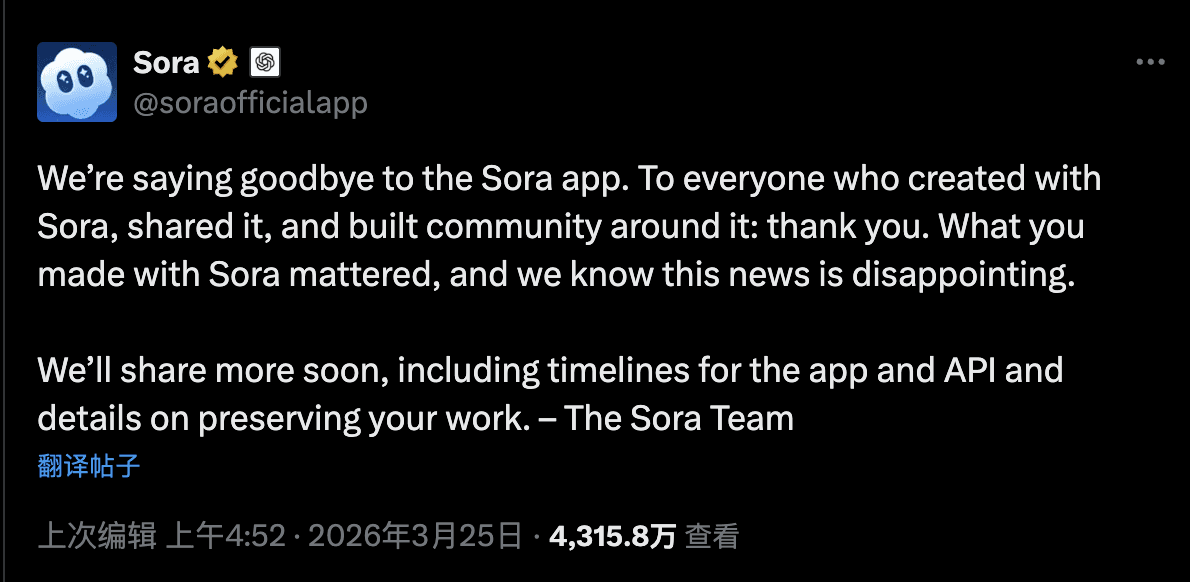
On March 24, 2026, OpenAI's Sora team posted a farewell message:
We're saying goodbye to the Sora app. To everyone who created with Sora, shared it, and built community around it: thank you. What you made with Sora mattered, and we know this news is disappointing.
— The Sora Team (@soraofficialapp)
The Sora app and API are being discontinued. For the thousands of creators who relied on Sora 2 for AI video generation, this raises a pressing question: what now?
What Happened to Sora?
Sora launched in September 2025 as a TikTok-style app for AI-generated videos, quickly climbing to #1 on Apple's US App Store. But the momentum didn't last:
- Fierce competition: Google's Veo, Luma Ray, and others quickly caught up and surpassed Sora in capability.
- Copyright issues: Users created videos with copyrighted characters and celebrity likenesses, leading to legal backlash — and ultimately Disney withdrawing its $1B investment deal.
- Strategic shift: OpenAI decided to reallocate Sora's compute resources toward AGI research and robotics simulation.
The result: both the Sora app and API are going offline. OpenAI has promised to share timelines and data preservation details soon.
Why Veo 3.1 Is the Best Alternative
If you've been using Sora 2 for video generation, Google Veo 3.1 is the clear upgrade. Here's why:
1. Much Longer Videos
Sora 2 maxed out at 15 seconds. Veo 3.1 supports up to 168 seconds (nearly 3 minutes) through multi-shot extension — up to 21 shots of 8 seconds each. That's enough for brand stories, tutorials, and complete narratives.
2. Character Consistency Across Shots
One of the biggest pain points with Sora was maintaining character consistency in longer sequences. Veo 3.1 solves this with video extension technology that preserves character appearance, clothing, and environment across multiple shots.
3. Higher Quality Output
- Resolution: 720p and 1080p
- Frame rate: 24fps with smooth motion
- Audio: Built-in audio support
- Cinematic quality: Enhanced understanding of complex scenes, lighting, and camera movements
4. Advanced Creation Modes
Veo 3.1 offers three generation modes:
- Text to Video — Describe your scene, get a video
- First & Last Frames — Upload 1-2 images to control start and end frames
- Reference Images — Upload 1-3 reference images for style-guided generation
5. No Expensive Subscription Required
Google charges $20/month for AI Pro or $250/month for AI Ultra2 to access Veo directly. On NanoPhoto.AI, you can use Veo 3.1 with pay-per-use credits — no subscription required. Each 8-second shot costs just 5 credits.
6. Massive Cost Savings
NanoPhoto.AI's pricing is approximately 25% of Google's direct API pricing. An 8-second video costs about $0.125–$0.25, compared to $1.2 via Google's API. That's 5-10x cheaper.
Sora 2 vs Veo 3.1: Side-by-Side Comparison
| Feature | Sora 2 | Veo 3.1 |
|---|---|---|
| Max Duration | 15 seconds | 168 seconds |
| Resolution | 720p | 720p / 1080p |
| Audio Support | Yes | Yes |
| Multi-Shot Stitching | No | Yes (up to 21 shots) |
| Character Consistency | Limited | Built-in across shots |
| Generation Modes | Text / Image to Video | Text / First-Last Frame / Reference |
| Pricing | 2 credits/video | 5 credits/8s shot |
| Status | Discontinued | Active |
How to Get Started with Veo 3.1 on NanoPhoto.AI
Making the switch is simple:
- Go to Veo 3.1 on NanoPhoto.AI
- Choose your shot count — 1 shot (8s), up to 21 shots (168s)
- Describe your video — or use our AI storyboard generator
- Generate — each 8-second shot costs 5 credits
The workflow is designed for zero learning curve. You can write a single theme description and let AI generate the full storyboard prompt for every shot, or fine-tune each shot individually.
What About Your Existing Sora Videos?
OpenAI has committed to sharing details on preserving your work. In the meantime:
- Download your videos from the Sora app before it goes offline
- Save your prompts — you can reuse them with Veo 3.1 (Veo handles complex prompts well)
- Re-create with Veo 3.1 — your 15-second Sora videos can become 168-second extended narratives
The Future of AI Video
Sora's shutdown is a reminder that the AI landscape moves fast. But for creators, this is actually good news — Veo 3.1 offers significantly more capability at a lower price point.
At NanoPhoto.AI, we're committed to making AI creation tools affordable and accessible. Whether you're a content creator, marketer, or storyteller, Veo 3.1 gives you the power to create professional-quality videos without breaking the bank.
執筆者

カテゴリー
関連記事
H3 Max TurboとMiniMax H3を比較:速度、画質、解像度、選び方
H3 Max TurboとMiniMax H3の違いを、速度、480P・768P・2K、生成時間、参照入力、動画編集、用途別に比較します。

動画プロンプト生成と手作業の比較
手作業のカット分析、汎用AI、専用ツールを、編集点・動作・修正時間で比較。同じ参考動画で使える判断基準を紹介します。
動画から文字を消す方法:実用的な4つの選択肢
字幕トラックの削除、トリミング、ぼかし、NanoPhoto.AIによる焼き付け字幕の除去まで、動画の文字を消す方法を解説します。
Newsletter
Join the community
Subscribe to our newsletter for the latest news and updates