LogoNanoPhoto.AI
  • H3 Max Turbo
  • Nano Banana
  • Video Reverse
  • Pricing
Home/FigCraft UI design

FIGCRAFT / YOUR LOCAL DESIGN DESK

FigCraft, in your browser.

An open-source UI design workspace, right in your browser. Bring your images, arrange editable layers and shape your next screen — all on your device.

FigCraft design workspacev0.6.0

Make room for your next idea.

Start with a blank canvas, or open our editable example. The editor loads only when you start.
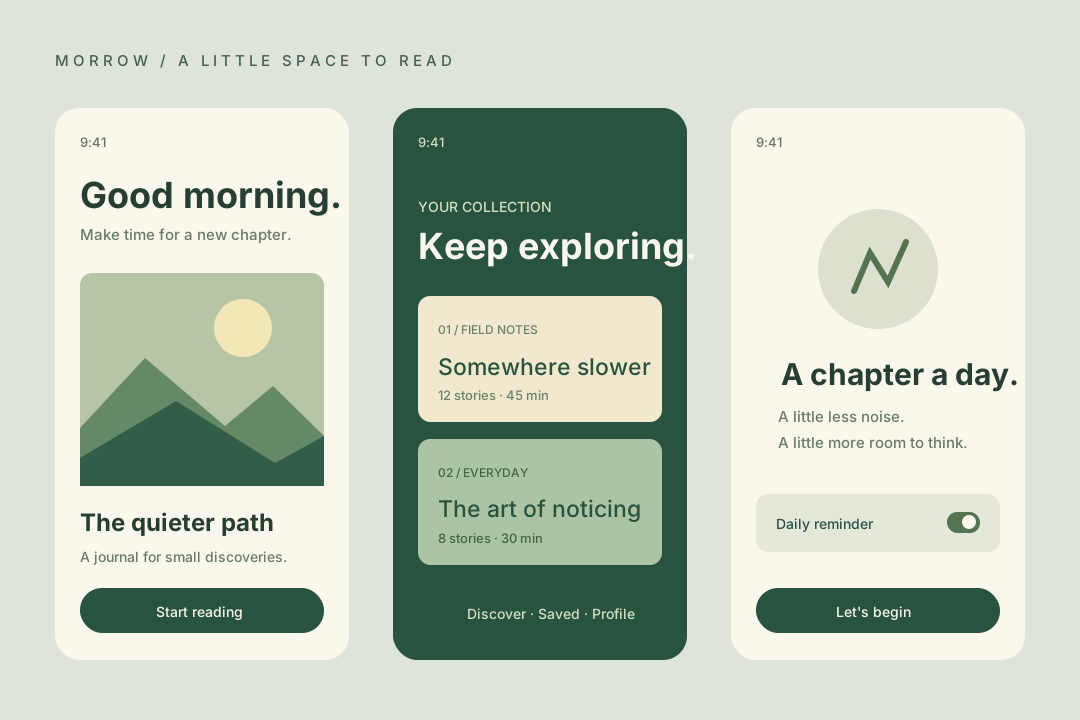
Original editable interface example with three reading-app screens
An original NanoPhoto example. Open it to edit the vector shapes and text.
  • Processed on your device
  • Free, without credits
  • No account needed

On a small screen, expand the workspace and use Panels to reveal the inspector. Desktop is recommended for detailed design.

A canvas with structure.

Create a screen, then keep every part editable. Use the design tools you need without sending your artwork to a processing server.

Frames and auto layout

Arrange interface elements into frames. Control spacing, padding and alignment as the design changes.

Components and prototypes

Reuse components and variants, then connect frames in the Prototype tab to explore an interaction.

Your images, editable layers

Bring in PNG, JPEG or WebP images. Import SVG artwork as vector layers; complex SVG features may differ.

Your first screen, in three steps.

  1. 01

    Open a workspace

    Launch the free editor or try the example. The first visit downloads the app; later visits can use the browser cache.

  2. 02

    Build and arrange

    Import a file, or use Frame, Rectangle and Text. Select a layer to adjust its properties in the inspector.

  3. 03

    Keep what you make

    Save an editable .figcraft file to your device. Export a selection, or the page, as PNG or SVG.

A useful alpha, with real limits.

FigCraft is early alpha. Format compatibility, prototypes and large documents need care. This integration supports local file import, design-file saving and PNG/SVG export; it does not include AI generation, online sharing or collaboration. Keep downloaded backups.

Before you begin.

Are my designs uploaded?

Basic editing, importing and exporting run in your browser. This editor does not upload design files to a processing service. Loading the app and its fonts still needs a network connection.

Is FigCraft free to use?

Yes. This local editor needs no account and consumes no NanoPhoto credits. Other NanoPhoto AI tools have their own pricing.

Can I continue a design later?

Use Save design to download a .figcraft file. Import that file on your next visit to continue. Keep your own copy; browser storage is not a guaranteed backup.

Does it replace Figma?

It is an independent open-source editor with familiar interface-design tools. It is still in alpha and does not offer full Figma compatibility or the same cloud services.

From image to finished design.

Edit images with PhotoCraftCreate an image with AIRemove an image background

NanoPhoto hosts an adapted FigCraft 0.6.0 build. Copyright ArtCraft Team and contributors, MIT OR Apache-2.0. Independent hosting; no official affiliation. Figma is a trademark of Figma, Inc.

LICENSE-MITLICENSE-APACHENOTICEATTRIBUTION.md
LogoNano Photo AI

Nano Photo AI — Making AI Photo and Video editing simple and efficient

GitHubGitHubTwitterX (Twitter)DiscordYouTubeYouTubeEmail

0.1%
of purchases contributed to Stripe Climate

Stripe Climate Logo

Nano Photo · Product

  • Features
  • Pricing
  • FAQ

Nano Photo · Resources

  • Blog
  • Documentation
  • Changelog
  • Affiliates
  • YouTube Trends Today

Nano Photo · Company

  • About
  • Contact
  • Waitlist

Nano Photo · Legal

  • Cookie Policy
  • Privacy Policy
  • Terms of Service

All creative tools

Video generation

  • WAN 3.0
  • ByteDanceSeedance 2.5
  • H3 Max Turbo
  • GeminiVeo 3.1
  • ByteDanceSeedance 2.0
  • Kling 3.0 Motion Control
  • Kling 2.6 Motion Control
  • MiniMax H3
  • Happy Horse 1.1

Image creation

  • Nano Banana
  • Nano Banana 2
  • ByteDanceSeedream 5.0 Pro
  • ByteDanceSeedream 5.0 Lite
  • GPT Image 2
  • GPT Image 2.5
  • Remove background
  • Upscale image
  • PhotoCraft Online Free
  • FigCraft UI design

Video tools

  • Video Reverse
  • FilmCraft Online Free
  • OpenCut Online Free
  • Video Translation
  • Video watermark remover
  • AI Video Subtitle Remover
  • AI Video Enhancer
  • Instagram Transcript Generator

Creator support

  • ByteDanceSeedance 2.0 Prompt Generator
  • Nano Banana Pro Prompt Generator
  • Seed Audio

Inspiration & utilities

  • AI Video Showcase
  • Nano Banana Pro Prompt Market
  • Image Converter Suite
  • YouTube Trends Today
  • Documentation
  • Changelog
Video generation
  • WAN 3.0
  • ByteDanceSeedance 2.5
  • H3 Max Turbo
  • GeminiVeo 3.1
  • ByteDanceSeedance 2.0
  • Kling 3.0 Motion Control
  • Kling 2.6 Motion Control
  • MiniMax H3
  • Happy Horse 1.1
Image creation
  • Nano Banana
  • Nano Banana 2
  • ByteDanceSeedream 5.0 Pro
  • ByteDanceSeedream 5.0 Lite
  • GPT Image 2
  • GPT Image 2.5
  • Remove background
  • Upscale image
  • PhotoCraft Online Free
  • FigCraft UI design
Video tools
  • Video Reverse
  • FilmCraft Online Free
  • OpenCut Online Free
  • Video Translation
  • Video watermark remover
  • AI Video Subtitle Remover
  • AI Video Enhancer
  • Instagram Transcript Generator
Creator support
  • ByteDanceSeedance 2.0 Prompt Generator
  • Nano Banana Pro Prompt Generator
  • Seed Audio
Inspiration & utilities
  • AI Video Showcase
  • Nano Banana Pro Prompt Market
  • Image Converter Suite
  • YouTube Trends Today
  • Documentation
  • Changelog
History tools

Video generation

  • SoraSora 2

Video tools

  • Remove Sora Watermark

Creator support

  • SoraSora Storyboard
  • TVC Ad Maker
  • Sora 2 Prompt Generator
© 2026 Nano Photo AI. All rights reserved.