Changelog
Track the evolution of our AI photo editing platform with new features, improvements, and bug fixes
Image and Video Cleanup Tools
v1.24.0NanoPhoto.AI adds AI video subtitle removal, image background removal, and image upscaling workflows
2026/06/18
New Cleanup and Enhancement Tools
We added three creator workflows for fast image and video cleanup:
- AI Video Subtitle Remover - remove burned-in subtitles from short videos, compare the before/after preview, and download a clean MP4.
- Remove Image Background - remove image backgrounds online and export transparent PNG results for product images, avatars, and marketing assets.
- Upscale Image - enlarge images with AI while preserving detail for sharper previews, listings, and publishing assets.
Credit Update
AI Video Subtitle Remover now charges by duration: 1 credit per 10 seconds, rounded up.
Seedance 2.0 Launch
v1.23.0NanoPhoto.AI launches Seedance 2.0 with fast/standard modes, multimodal references, and integrated prompt workflow
2026/04/06
Seedance 2.0 Is Live
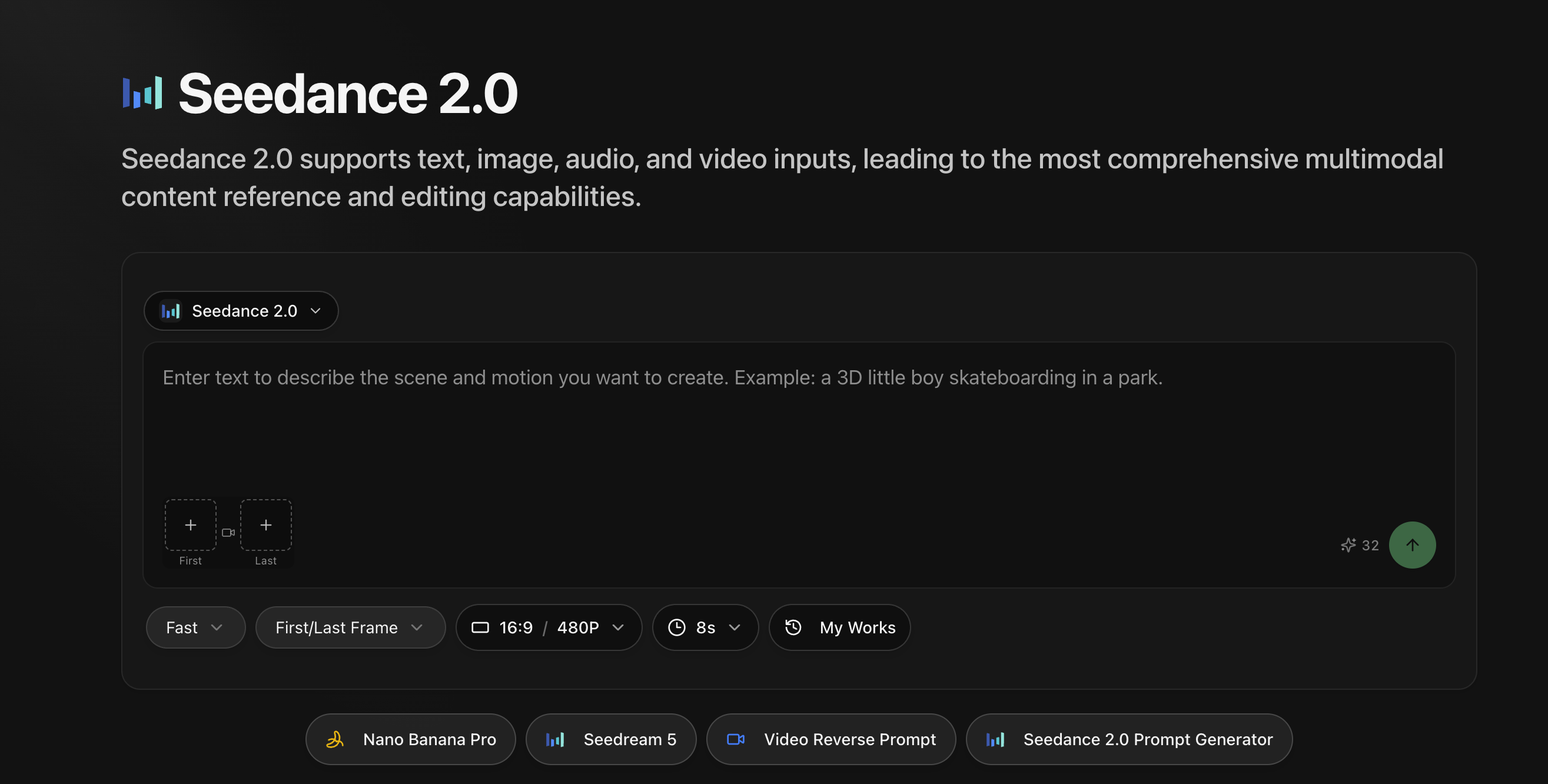
ByteDance Seedance 2.0 is now available on NanoPhoto.AI
We've launched Seedance 2.0 with a complete generation workflow for text-to-video and reference-based video creation.
What's New
- Dual model variants - choose
FastorStandardbased on speed/quality needs - Flexible references - support first/last frame and multimodal references (image, video, audio)
- Prompt workflow integration - open Seedance 2.0 Prompt Generator in the same creation flow
- Result actions ready - generated videos now provide both Download and a 作品信息 entry for follow-up management
Start Creating
Go to Seedance 2.0, enter your prompt or upload references, then generate and iterate in one place.
OpenClaw Skills
v1.22.0NanoPhoto.AI launches OpenClaw skills — generate videos, images, and comic dramas from Telegram, Feishu, WeChat and more
2026/03/26
OpenClaw Skills
Use NanoPhoto.AI's AI capabilities directly from chat
We've officially launched our OpenClaw skill set, letting you generate videos, images, and prompts through Telegram, Feishu (Lark), WeChat, and more — no browser needed.
Official skill directory: clawhub.ai/u/nanophotohq
8 Skills Available
comic-drama-generate — Comic-drama production pipeline: a complete workflow from script to final cut, chaining multiple skills for character-consistent comic drama production.
- sora-2-generate — Sora 2 text-to-video & image-to-video
- veo-3-1 — Veo 3.1 multi-shot long video, up to 168s
- nano-banana-pro — AI image generation & editing
- nano-banana-2 — Image generation with Google Search enhancement
- video-prompt-generator — Professional video prompt generation
- video-reverse-prompt — Extract prompts from existing videos
- sora-watermark-remover — Remove Sora 2 video watermarks
One-Line Install
npx clawhub@latest install <skill-name>Comic Drama Pipeline
A complete production pipeline from script to final cut
The new comic-drama-generate skill chains multiple skills into a character-consistent comic-drama production pipeline:
- Define style and series bible
- Generate script foundation (
video-prompt-generator) - Generate character turnarounds (
nano-banana-pro) - Generate keyframes (
nano-banana-pro) - Write shot script (
video-prompt-generator) - Generate videos (
sora-2-generate) - Merge with FFmpeg
Consistency chain: Character Turnarounds → Keyframes → Image-to-Video
Full documentation: OpenClaw Skills Docs
API Management & Documentation
v1.21.0New API Key management with Video Reverse Prompt and Sora 2 Watermark Removal APIs; brand-new documentation system
2026/03/21
API Management
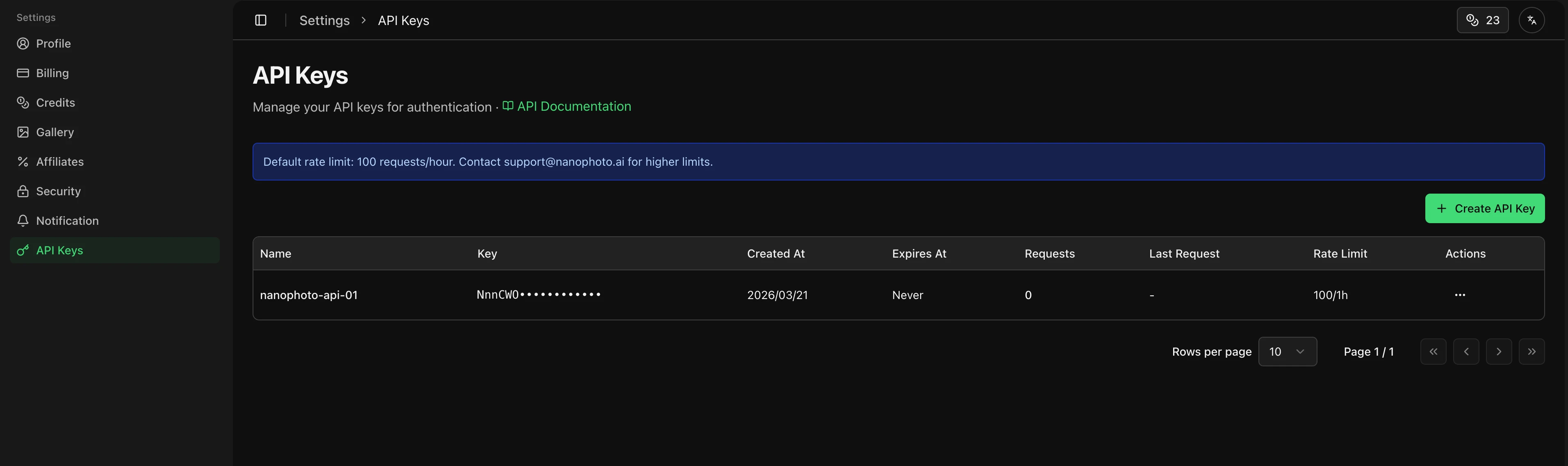
Integrate NanoPhoto.AI capabilities via API
We're officially opening API access (gradual rollout), starting with these endpoints:
- Video Reverse Prompt API — Analyze videos and generate prompts via API
- Sora 2 Watermark Removal API — Remove watermarks from Sora-generated videos via API
How to Get Started
- Go to Settings - API Keys
- Create your API Key
- Use
Authorization: Bearer <your-api-key>in your request headers - API calls are billed using credits, same as the web interface
Documentation System
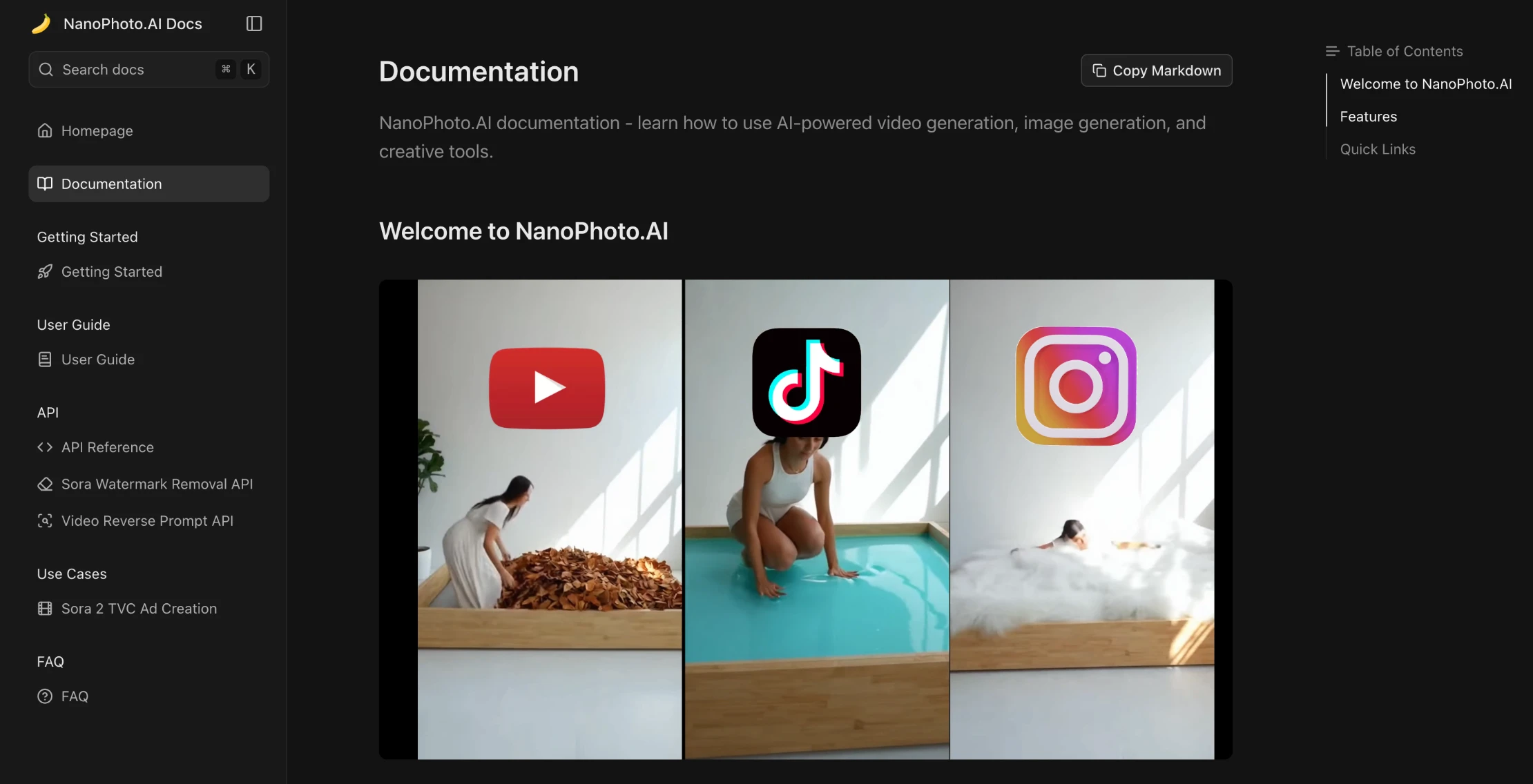
A brand-new developer documentation hub
We've launched a comprehensive Documentation System providing full API references and guides:
- API Reference — Detailed endpoint descriptions, parameters, and response formats
- Quick Start — Get your first API call running in minutes
- Code Examples — Multi-language code samples for fast integration
Visit the Documentation Hub to explore.
Video Reverse Prompt History
v1.20.0Quickly browse and copy your past video reverse prompt results with the new prompt history panel
2026/03/09
Prompt History for Video Reverse Prompt
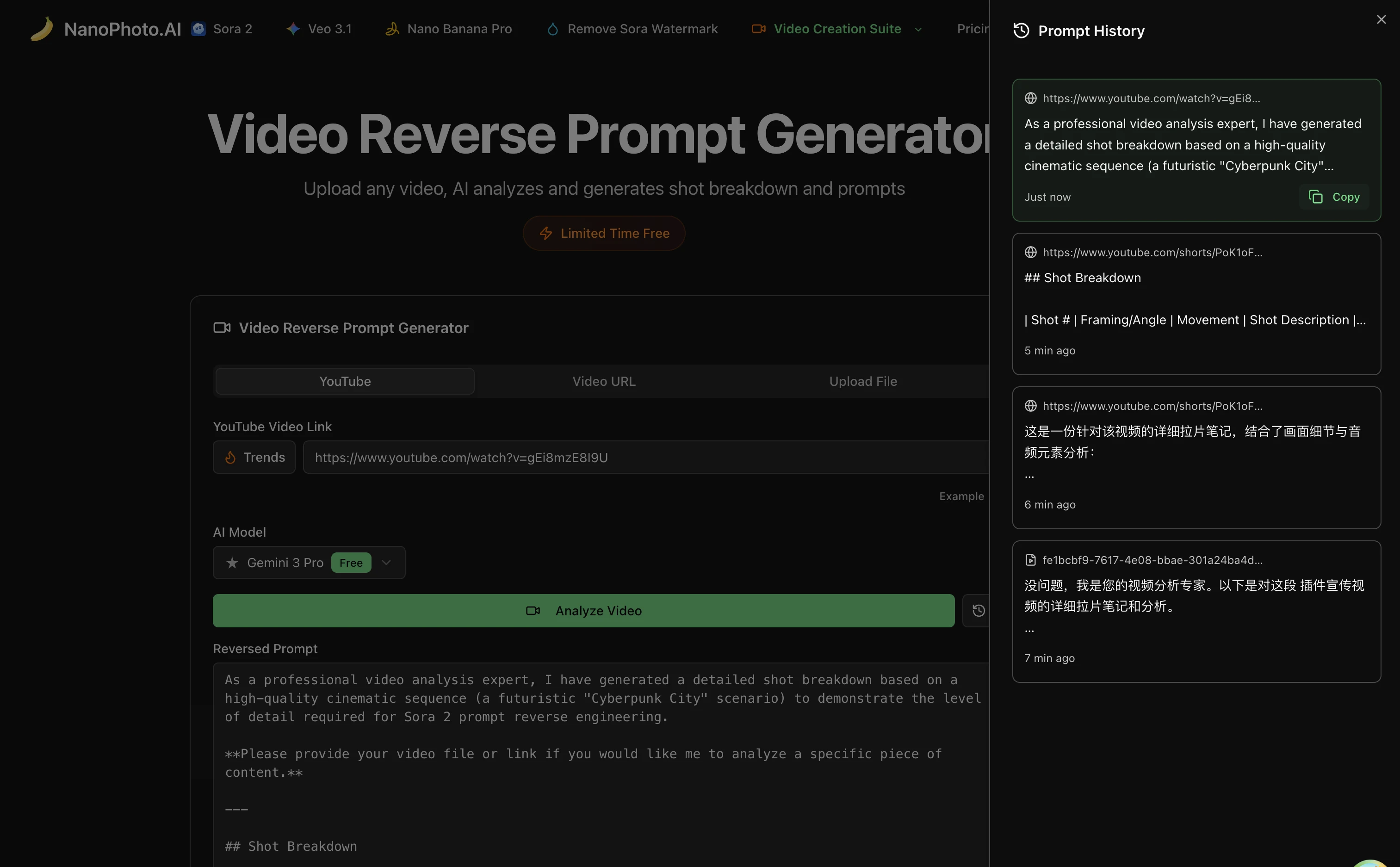
Never Lose a Prompt Again
- One-Click Access: Click the history icon next to the "Analyze Video" button to open the prompt history panel
- Browse Past Results: View all your previously generated reverse prompts in a clean, scrollable list
- Quick Copy: Hover over any history item and click to copy the full prompt to your clipboard
- Source Tracking: Each entry shows the original video source — YouTube link, video URL, or uploaded file name
- Paginated View: Navigate through your history with easy pagination controls
Getting Started
- Go to the Video Reverse Prompt page
- Click the history icon (clock) next to the "Analyze Video" button
- Browse your past prompts and click "Copy" on any entry to reuse it
Preferred Language, Bulk Purchase Rewards, WeChat/Alipay Annual Plans & Referral Program
v1.19.0Set your preferred language, buy more credits and get more bonus, WeChat/Alipay annual subscription for Chinese users, and invite friends to earn credits
2026/03/07
Set Preferred Language
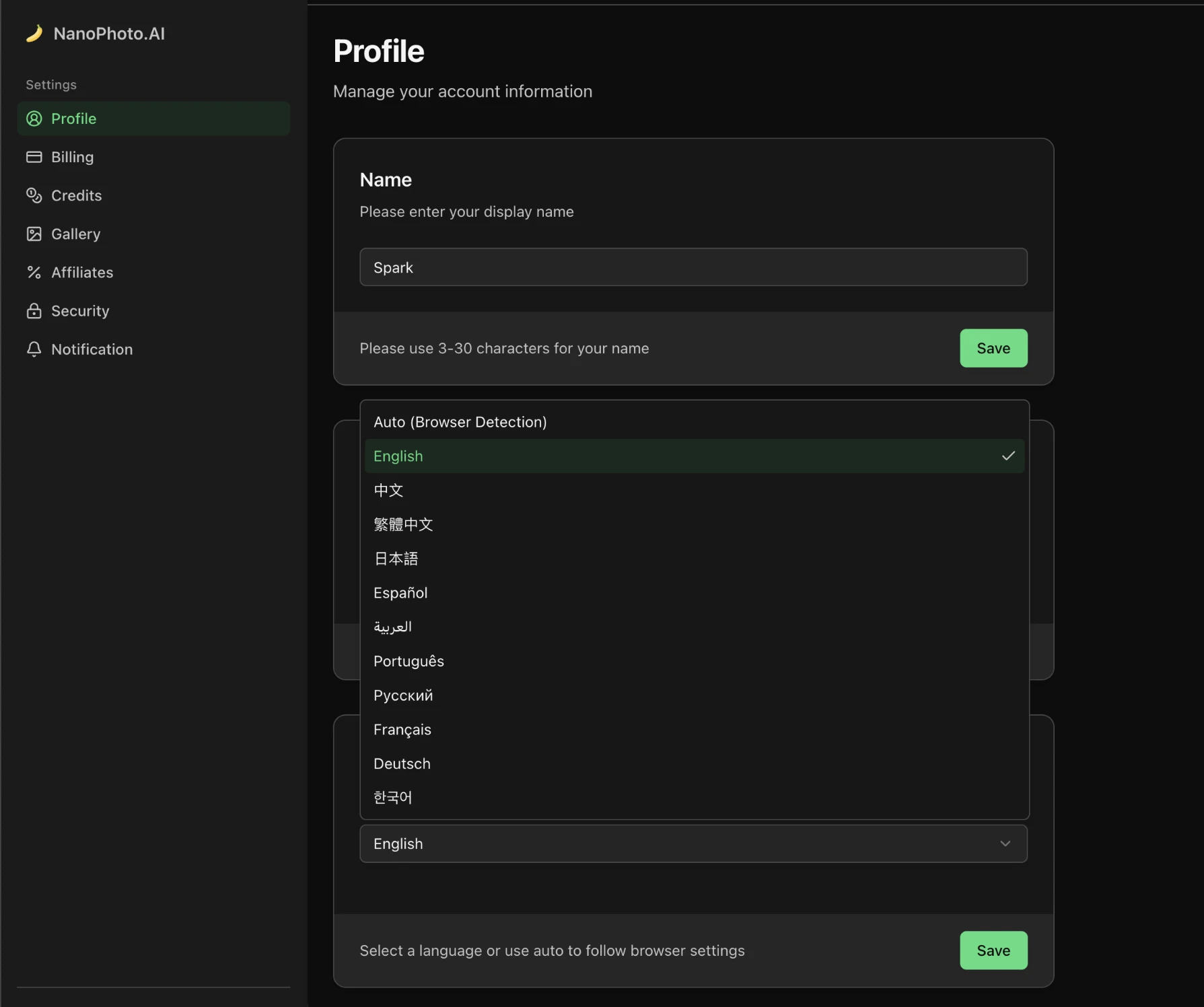
Personalized Language Experience
- Language Preference: Choose your preferred language in settings
- AI Generation Adaptation: AI-generated content will prioritize your preferred language
- 11 Languages: English, Chinese, Traditional Chinese, Japanese, Korean, Spanish, Arabic, Portuguese, Russian, French, German
Buy More, Get More Rewards
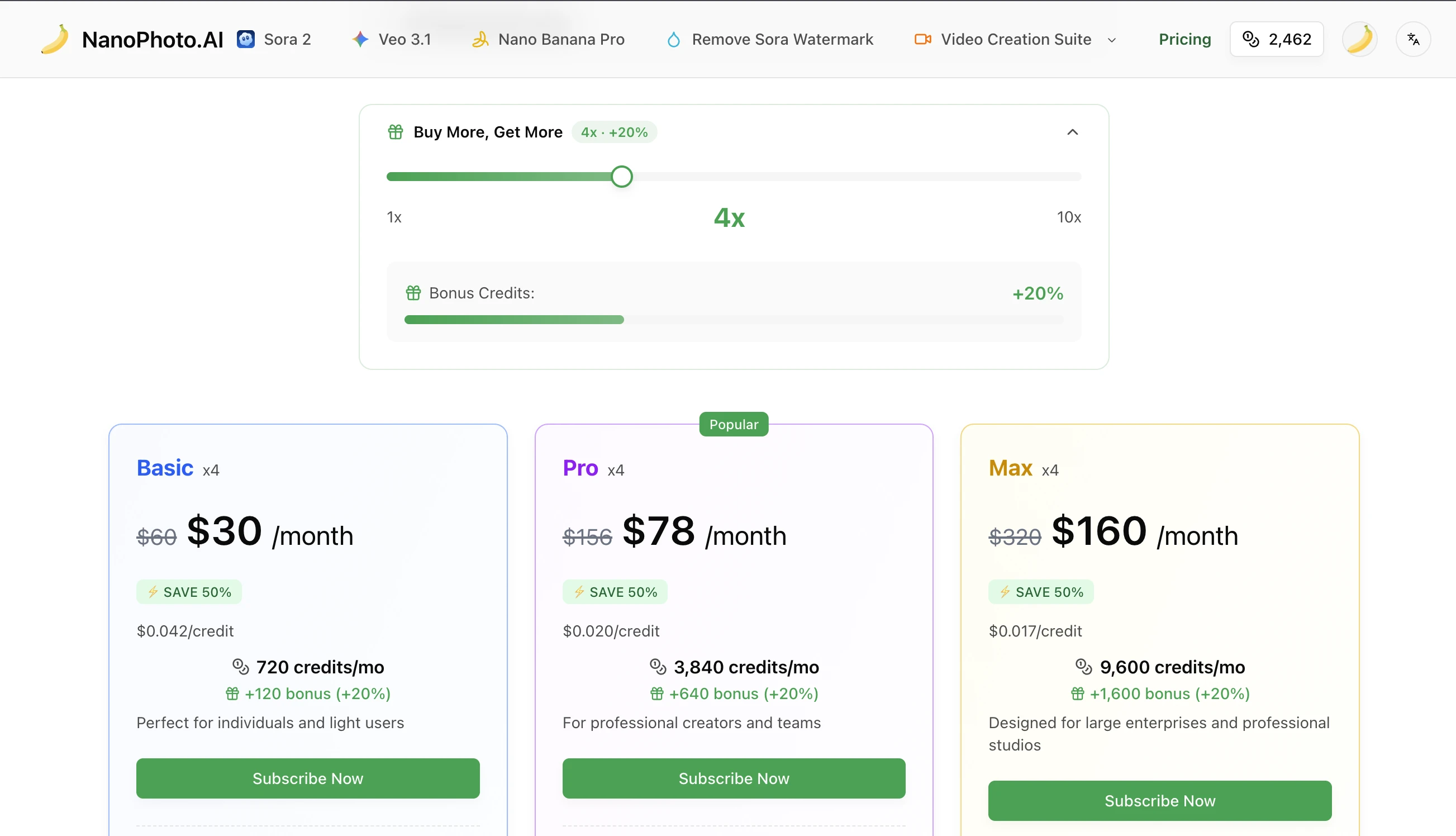
Flexible Bulk Purchasing
- Multi-Pack Purchase: Buy multiple credit packs at once without repeated checkout
- Tiered Rewards: The more you buy, the more bonus credits you receive
- Instant Delivery: Credits are available immediately after purchase
WeChat & Alipay Annual Subscription
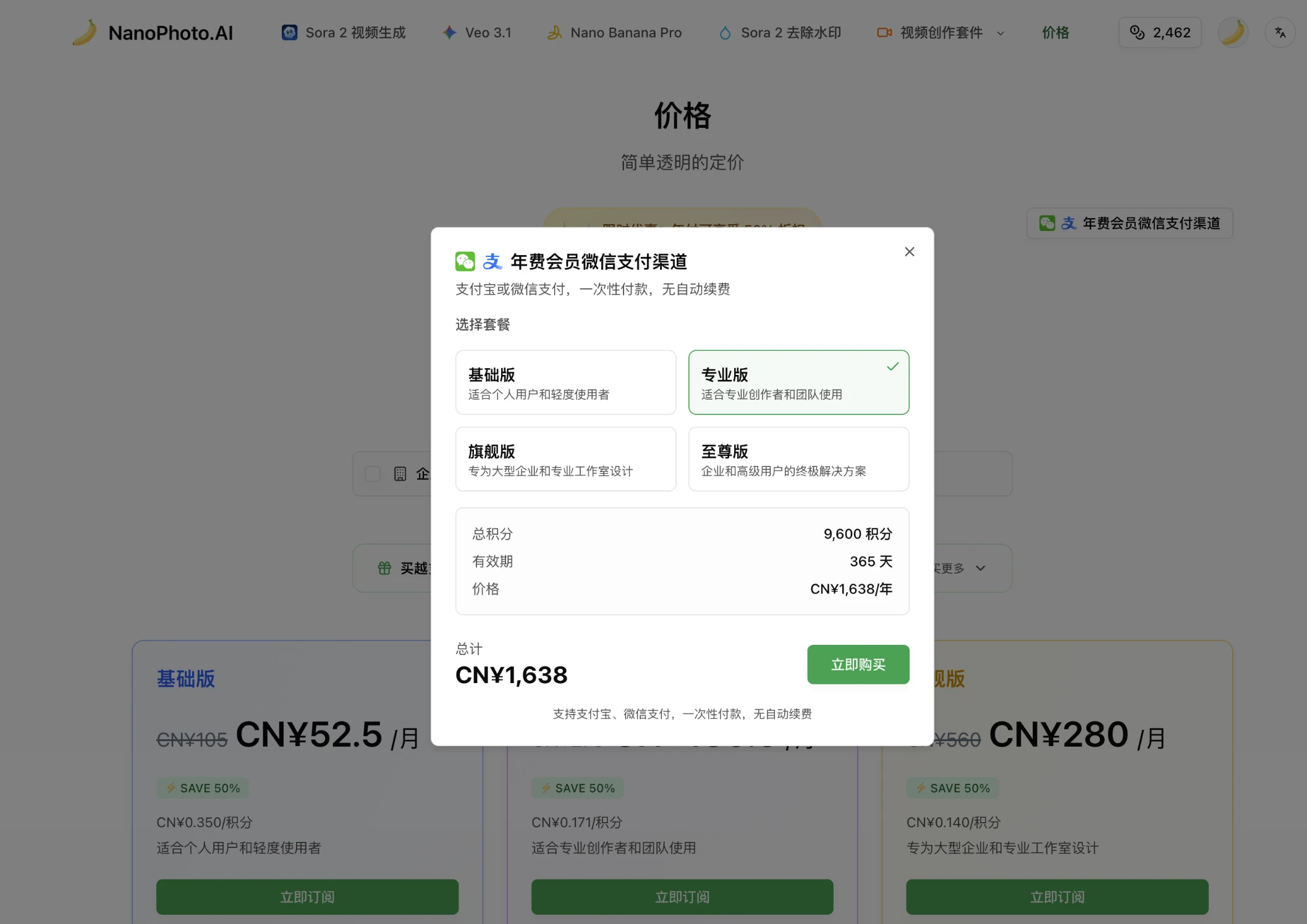
Dedicated Payment Channels for Chinese Users
- WeChat Pay: Scan to pay for annual subscription via WeChat
- Alipay: Scan to pay for annual subscription via Alipay
- One-Time Annual Payment: No credit card required, pay once for a full year of membership
- Auto Display: WeChat/Alipay options appear automatically in Chinese language settings
Invite Friends, Both Earn Credits
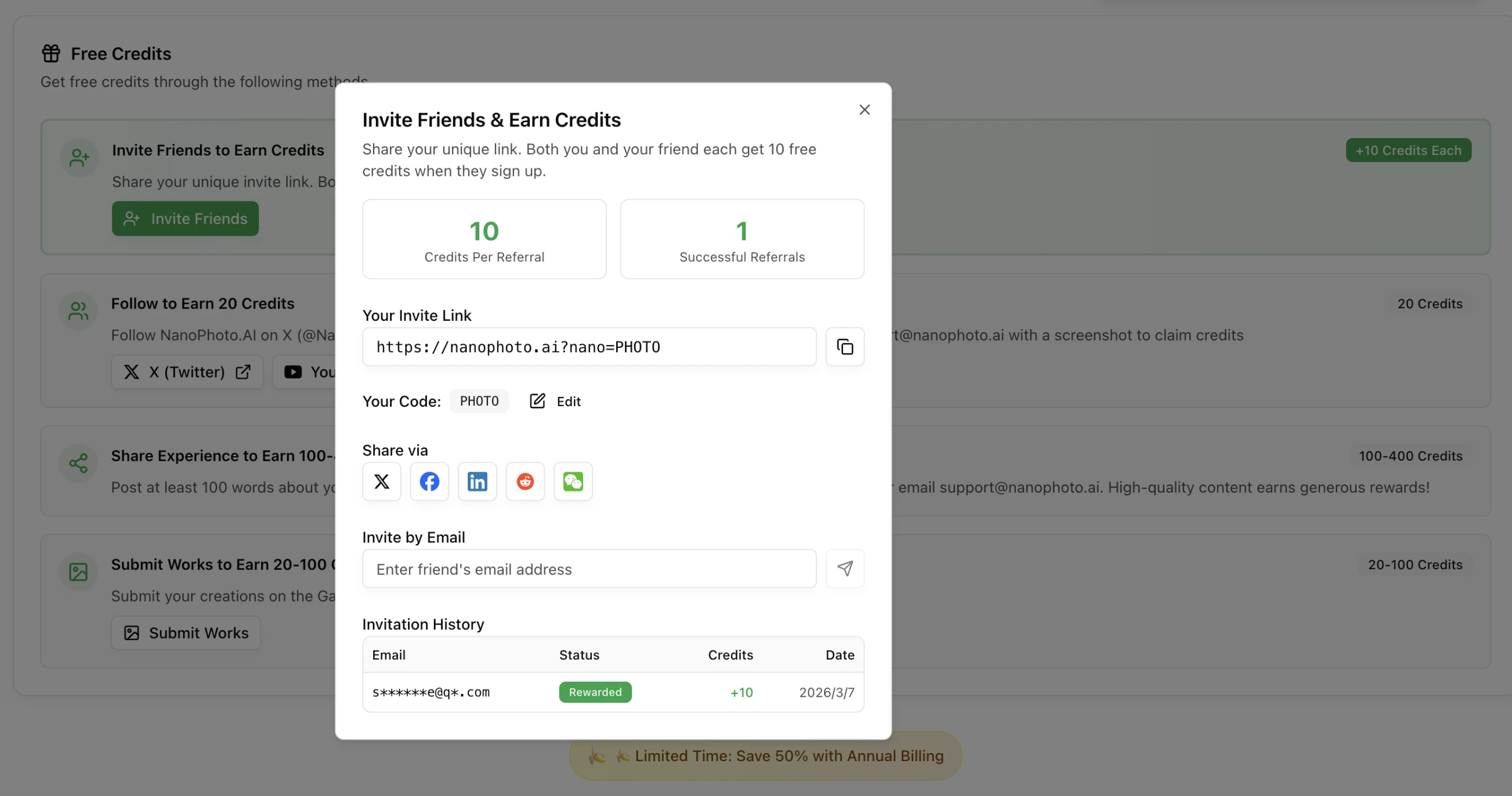
Referral Rewards
- Mutual Benefit: You and your invited friend each receive 10 bonus credits
- Unique Referral Link: Get your personal referral link from the settings page
- Easy Sharing: Share your link, and both earn credits after your friend signs up
- Unlimited Invites: The more friends you invite, the more credits you earn
Getting Started
Set Preferred Language
- Go to Settings page
- Select your preferred language
- Save your settings
Buy Credits in Bulk
- Go to the credits purchase page
- Choose a credit pack and quantity
- Buy more to unlock bigger rewards
Use WeChat/Alipay for Annual Plan
- Switch to Chinese language
- Go to subscription page and select annual plan
- Choose WeChat Pay or Alipay
Invite Friends
- Go to Settings page
- Copy your unique referral link
- Share with friends — both earn 10 credits each
Veo 3.1 4K Support & Tag Cloud Navigation
v1.18.0Veo 3.1 now supports 4K resolution output, new footer tag cloud for better content discovery and filtering
2026/01/24
Veo 3.1 4K Resolution Support
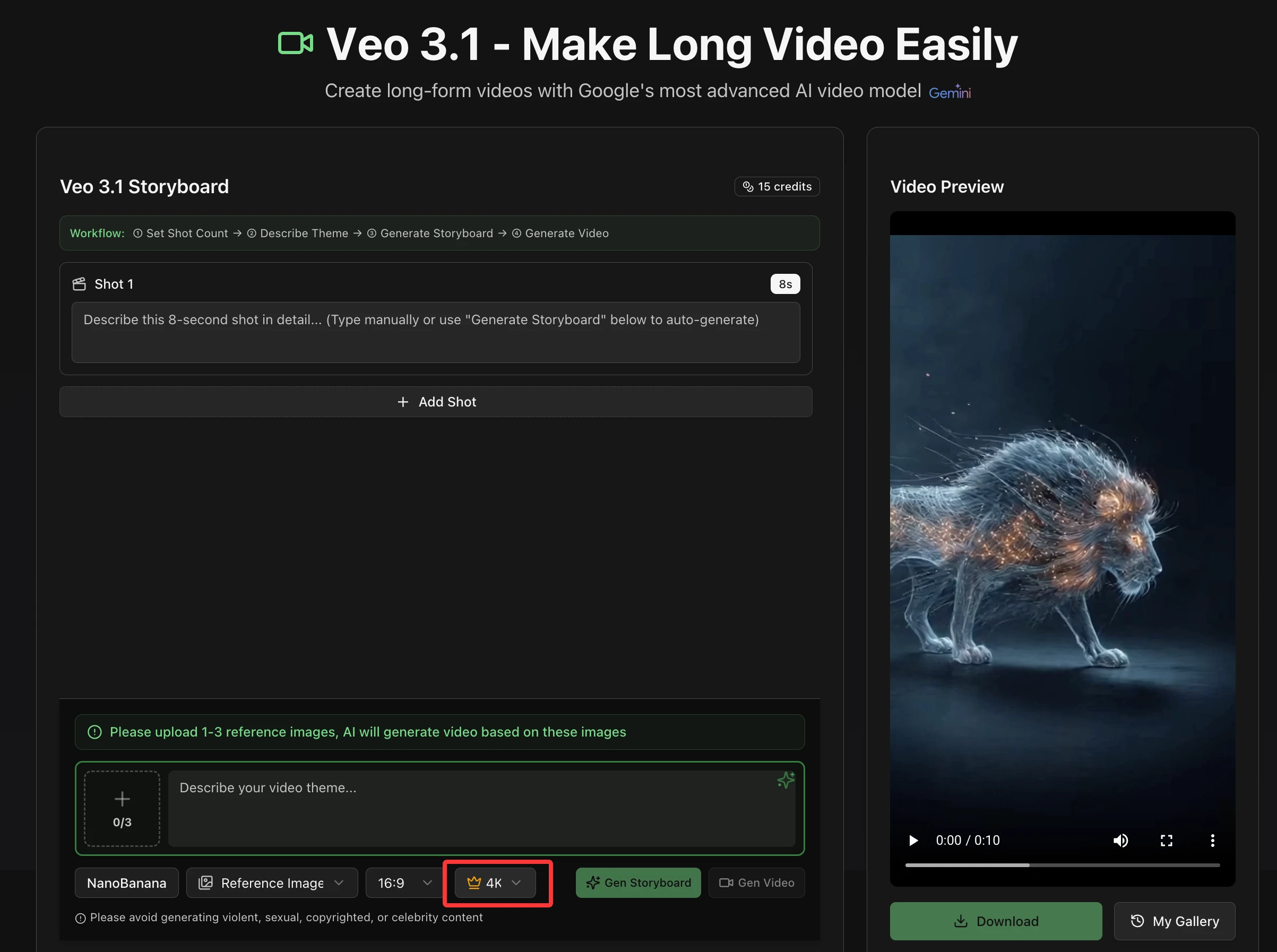
Ultra-High Definition Video Output
- 4K Resolution: Generate stunning 4K videos with Veo 3.1
- Dual Aspect Ratios: 4K supports both 16:9 (landscape) and 9:16 (portrait)
- Premium Quality: Crystal clear video output for professional use
- Fixed Pricing: 15 credits per 4K video generation
Resolution Options
| Resolution | Single Shot | Multi-Shot | 16:9 | 9:16 | Credits |
|---|---|---|---|---|---|
| 720p | ✅ | ✅ | ✅ | ✅ | 5/shot |
| 1080p | ✅ | ❌ | ✅ | ❌ | 7 |
| 4K (New) | ✅ | ❌ | ✅ | ✅ | 15 |
How 4K Generation Works
- Create your video with Veo 3.1 (single shot mode)
- Select 4K resolution option
- Video generates at 720p first, then upscales to 4K
- Processing takes approximately 5-10 minutes
- Automatic fallback to 720p if 4K processing fails
Footer Tag Cloud for Content Discovery
Tag Navigation
- Dual Category Display: Separate sections for Video Showcase and Image Prompt Market
- Popular Tags: Shows most-used tags from community content
- One-Click Filtering: Click any tag to filter content instantly
- URL-Based State: Tag filters are reflected in URL for sharing and bookmarking
Tag Cloud Features
- Video Showcase Tags: Browse popular tags from Sora 2, Veo 3, and Storyboard videos
- Prompt Market Tags: Discover trending tags from Nano Banana Pro images
- Smart Visibility: Tag cloud hides automatically when no tags available
- Multi-Language Support: Fully localized in all 11 languages
Improved Tag Filtering
- Tags now update the URL with
?tag=xxxparameter - Browser back/forward navigation works with tag filters
- Share filtered views directly via URL
- Seamless integration with existing gallery browsing
Benefits Summary
For Video Creators
- 4K Quality: Professional-grade video output
- Flexible Formats: 4K works with both landscape and portrait
- Clear Pricing: Simple 15-credit flat rate for 4K
For Content Discovery
- Tag Navigation: Find content by popular tags
- Shareable Filters: Share filtered views via URL
- Better Browsing: Explore curated collections easily
Getting Started
Generate 4K Video
- Go to Veo 3.1 generator
- Create a single-shot video
- Select 4K resolution (15 credits)
- Wait for processing (5-10 minutes)
- Download your 4K masterpiece
Discover Content by Tags
- Scroll to website footer
- Browse Video Showcase or Prompt Market tags
- Click any tag to filter content
- Explore curated collections
- Share filtered views with others
Nano Banana Pro Enhancements & Workflow Integration
v1.17.0Improved image generation success rate, new 1K resolution output, Twitter sharing, and seamless Sora 2 integration
2025/11/29
Nano Banana Pro Image Generation Improvements
Enhanced Success Rate
- Optimized Generation: Improved stability and success rate for image generation
- Better Reliability: Reduced generation failures and timeouts
- Consistent Quality: More reliable output quality across different prompts
- Smoother Experience: Fewer retries needed for successful generation
New 1K Resolution Output
- Affordable Option: Generate 1K resolution images for just 2 credits
- Cost-Effective: Perfect for quick previews and social media content
- Fast Generation: Quicker processing time for lower resolution
- Flexible Choices: Now offering multiple resolution tiers to fit your needs
Pricing Tiers
| Resolution | Credits |
|---|---|
| 1K (New) | 2 |
| 2K | 4 |
| 4K | 6 |
Twitter Sharing Integration
Share Directly to Twitter
- One-Click Sharing: Send generated images directly to Twitter
- Seamless Workflow: No need to download and re-upload
- Quick Publishing: Share your AI creations instantly
- Social Integration: Connect your creative workflow with social media
How It Works
- Generate an image with Nano Banana Pro
- Click the Twitter share button
- Add your caption and post
- Share your AI-generated artwork with the world
Benefits
- Time Saving: Skip the download-upload cycle
- Immediate Sharing: Post while inspiration is fresh
- Better Engagement: Share high-quality AI art effortlessly
- Creative Showcase: Show off your AI-powered creativity
Video Reverse Prompt Optimization
YouTube Trends Integration
- Hot Videos Selection: Choose from today's YouTube trending videos
- Easy Discovery: Browse popular content for inspiration
- Quick Analysis: Analyze trending videos with one click
- Learn from Trends: Understand what makes viral content
Enhanced Prompt Rewriting
- Improved Accuracy: Better prompt extraction from videos
- Creative Variations: Generate optimized prompt variations
- Style Analysis: Better understanding of video aesthetics
- Detailed Output: More comprehensive prompt descriptions
Workflow Enhancement
- Browse YouTube Trends Today
- Select an interesting video
- One-click reverse prompt extraction
- Get optimized, rewritten prompts
- Use prompts to create your own videos
Sora 2 & Nano Banana Pro Integration
Seamless Image-to-Video Workflow
- Quick Selection: Easily select Nano Banana Pro generated images for Sora 2
- One-Click Import: Import your AI images directly into video generation
- Unified Workflow: Streamlined creative process from image to video
- Better Results: Use high-quality AI images as video starting points
How to Use
- Generate images with Nano Banana Pro
- Go to Sora 2 video generator
- Select your Nano Banana Pro images from the gallery
- Generate videos based on your AI-created images
- Create stunning image-to-video content
Benefits
- Creative Continuity: Maintain artistic style from image to video
- Faster Workflow: No manual file management needed
- Quality Assurance: Use proven, high-quality AI images
- Inspiration Flow: Let one creation inspire the next
Technical Improvements
Backend Optimizations
- Generation Pipeline: Improved image generation stability
- API Performance: Faster response times for image creation
- Error Handling: Better recovery from temporary failures
- Resource Management: Optimized server resource allocation
UI/UX Enhancements
- Share Buttons: New Twitter sharing interface
- Gallery Integration: Improved image selection in Sora 2
- Resolution Selection: Clear pricing display for resolution tiers
- Progress Feedback: Better generation progress indicators
Integration Updates
- YouTube API: Enhanced trending video data fetching
- Twitter API: New social sharing capabilities
- Cross-Feature Flow: Improved data sharing between features
- Session Management: Better handling of user-generated content
Benefits Summary
For Content Creators
- More Options: New 1K resolution at affordable pricing
- Social Reach: Direct Twitter sharing capability
- Trend Awareness: Easy access to YouTube trending content
- Unified Workflow: Seamless image-to-video creation
For Social Media Managers
- Quick Publishing: Share AI art to Twitter instantly
- Cost Control: Choose resolution based on needs and budget
- Trend Analysis: Learn from viral video content
- Content Pipeline: Efficient creative production flow
For All Users
- Better Reliability: Improved generation success rate
- Lower Costs: 1K images starting at just 2 credits
- Easier Sharing: One-click social media publishing
- Smoother Workflow: Connected features work together
Getting Started
Try 1K Resolution
- Go to Nano Banana Pro
- Enter your prompt
- Select 1K resolution (2 credits)
- Generate your image
- Share to Twitter or use in Sora 2
Reverse Prompt from Trends
- Visit Video Reverse Prompt
- Browse YouTube Trends Today
- Select a trending video
- Extract and optimize the prompt
- Create your own viral content
Image-to-Video Workflow
- Create images with Nano Banana Pro
- Open Sora 2 generator
- Select your images from gallery
- Generate videos from your AI art
- Download or share your creation
Coming Soon
- Additional social media platform integrations
- More resolution options with competitive pricing
- Enhanced trend analysis and recommendations
- AI-powered prompt optimization suggestions
- Batch image generation capabilities
Batch Video Generation & Enhanced AI Models
v1.16.0Sora 2 now supports batch generation (1-4 videos), Gemini 3 Pro integration, and improved error handling
2025/11/20
New Feature: Sora 2 Batch Video Generation
Generate Multiple Videos at Once
- Batch Creation: Generate 1-4 videos simultaneously for better selection
- Quality Optimization: Pick the best result from multiple outputs
- Efficiency Boost: Save time by generating variations in one go
- Smart Selection: Compare and choose the highest quality video
How It Works
- Enter your video prompt as usual
- Select batch quantity (1-4 videos)
- Generate all videos at once
- Review and select the best result
- Download your preferred video
Benefits
- Better Results: Multiple attempts increase chances of perfect output
- Time Saving: No need to regenerate one by one
- Quality Control: Compare variations side by side
- Creative Options: Explore different interpretations of your prompt
Enhanced AI Models: Gemini 3 Pro Support
Upgraded Prompt Generation
- Gemini 3 Pro Integration: Now available in Sora 2 Prompt Generator
- Limited-Time Free: Free access during promotional period
- Higher Quality: More accurate and creative prompt generation
- Better Understanding: Improved context comprehension
Video Reverse Prompt Enhancement
- Gemini 3 Pro Analysis: Advanced video-to-prompt conversion
- Limited-Time Free: Promotional free access
- Deeper Insights: More detailed prompt extraction
- Better Accuracy: Improved prompt reconstruction
Creative Workflow Boost
- Professional Prompts: Generate high-quality video prompts
- Reverse Engineering: Learn from existing videos
- Rapid Iteration: Quickly refine your creative ideas
- Cost-Effective: Free access to premium AI models
Improved Error Handling
Clear Error Messages
- Direct Display: See exact error reasons when video generation fails
- Actionable Feedback: Understand what went wrong
- Quick Resolution: Fix issues faster with clear guidance
- Better Debugging: Detailed error information for support
Enhanced User Experience
- No More Guessing: Know exactly why generation failed
- Faster Fixes: Resolve issues without trial and error
- Better Support: Provide clear error info when seeking help
- Improved Reliability: Better error tracking and resolution
Sora Storyboard Optimization
25-Second Duration Enhancement
- Improved Interaction: Better UI for 25-second total duration
- Clearer Controls: Enhanced duration selection interface
- Better Feedback: Real-time duration calculation
- Smoother Workflow: Optimized storyboard creation process
User Experience Improvements
- Intuitive Design: Easier to understand duration settings
- Visual Feedback: Clear indication of total video length
- Error Prevention: Better validation for duration inputs
- Seamless Creation: Smoother storyboard generation flow
Translation Protection
Prevent Page Translation Issues
- Disabled Web Translation: Block automatic page translation
- Prevent Errors: Avoid "page not found" issues from translation
- Consistent Experience: Maintain proper functionality across languages
- Better Stability: Prevent translation-related bugs
Why This Matters
- Functionality Protection: Ensure all features work correctly
- Route Preservation: Prevent translated URLs breaking navigation
- User Safety: Avoid confusion from mistranslated interfaces
- Quality Assurance: Maintain intended user experience
Technical Improvements
Performance Enhancements
- Batch Processing: Optimized parallel video generation
- Model Integration: Seamless Gemini 3 Pro API integration
- Error Logging: Enhanced error tracking and reporting
- Resource Management: Better handling of concurrent requests
API Updates
- Batch Endpoint: New API support for multiple video generation
- Error Responses: Improved error message structure
- Rate Limiting: Better quota management for batch requests
- Retry Logic: Enhanced retry mechanism for failed generations
UI/UX Refinements
- Batch Selection: New UI for choosing generation quantity
- Progress Tracking: Better feedback for batch generation
- Error Display: Improved error message presentation
- Duration Controls: Enhanced storyboard duration interface
Getting Started
Try Batch Generation
- Go to Sora 2 video generator
- Enter your video prompt
- Select batch quantity (1-4)
- Click generate
- Review all results and pick the best
Use Gemini 3 Pro
- Access Sora 2 Prompt Generator or Video Reverse Prompt
- Look for "Gemini 3 Pro" model option
- Generate prompts with enhanced AI
- Enjoy limited-time free access
Better Error Handling
- When generation fails, check the error message
- Follow suggested actions to fix issues
- Contact support with error details if needed
Benefits Summary
For Content Creators
- More Options: Generate multiple videos per attempt
- Better Quality: Select from multiple AI-generated results
- Advanced AI: Access to Gemini 3 Pro capabilities
- Clear Feedback: Understand errors and fix them quickly
For Professionals
- Efficiency: Batch generation saves time
- Quality Control: Compare and select best outputs
- Reliability: Better error handling and stability
- Cost-Effective: Free access to premium AI models
For All Users
- Improved Experience: Smoother workflow and better feedback
- More Control: Choose from multiple generation results
- Better Support: Clear error messages for troubleshooting
- Enhanced Stability: Translation protection and error handling
Coming Soon
- Extended batch generation (up to 10 videos)
- AI-powered quality scoring for batch results
- Automatic best-result selection
- Advanced error recovery mechanisms
- More AI model integrations
Standalone Tools & TVC Ad Maker Launch
v1.15.0Video Reverse Prompt & Prompt Generator upgraded to standalone pages with limited-time free access, plus new Sora 2 TVC Ad Maker
2025/11/17
New Feature: Sora 2 TVC Ad Maker
Professional TVC Ads Made Easy
- Simplified Workflow: Create professional TVC ads with just a theme and reference image
- AI-Powered Storyboard: Automatically generate 9-panel storyboards for your commercial
- Voice-Over Support: Optional voice-over script input for complete ad production
- Flexible Duration: Choose between 10s or 15s video lengths
- End-to-End Solution: From concept to final video in one seamless workflow
How It Works
- Input Your Theme: Describe your product or service
- Upload Reference: Optional reference image for visual guidance
- Add Voice-Over: Optional script for narration
- Generate Storyboard: AI creates professional 9-panel storyboard
- Create Video: Sora 2 produces your TVC ad
Perfect For
- Small Businesses: Create professional ads without expensive production
- Marketing Teams: Rapid prototyping of ad concepts
- Content Creators: Produce commercial-quality content
- Agencies: Quick client presentations and mockups
Technical Features
- Powered by Gemini 2.5 Flash for storyboard generation
- Gemini 2.5 Flash Preview Image for visual creation
- Sora 2 for final video production
- Professional TVC cinematography style
- Integrated audio: voice-over, sound effects, and background music
Enhanced Standalone Tools
Video Reverse Prompt - Now Independent
- Dedicated Page: Full-featured standalone tool at
/video-reverse-prompt - Limited-Time Free: Free access during promotional period
- Enhanced UI: Improved interface with better workflow
- Direct Navigation: Easy access from Nano Banana menu
- Complete Features: All analysis capabilities in one place
Sora 2 Prompt Generator - Upgraded
- Standalone Access: Independent page at
/sora-2-prompt-generator - Limited-Time Free: Promotional free access period
- Optimized Experience: Dedicated interface for prompt generation
- Quick Navigation: Available in Nano Banana menu
- Full Functionality: All AI models and features included
User Experience Improvements
Navigation Updates
- New "Nano Banana" menu section for creative tools
- Direct access to all standalone tools
- Improved tool discoverability
- Better organization of features
Visual Enhancements
- Limited-time free badges on promotional tools
- Consistent design across all tool pages
- Enhanced hero sections with clear value propositions
- Professional tool descriptions and use cases
Performance Optimizations
- Faster page loading for standalone tools
- Improved AI response times
- Better error handling and user feedback
- Optimized image and video processing
Technical Improvements
Architecture Updates
- Modular tool components for better maintainability
- Shared UI components across tools
- Improved state management
- Better error boundaries
API Enhancements
- New TVC ad generation endpoint
- Improved retry logic for AI models
- Better rate limiting and quota management
- Enhanced logging and monitoring
SEO Optimizations
- Proper metadata for all new pages
- Canonical URLs and hreflang tags
- Optimized Open Graph and Twitter cards
- Improved page descriptions and keywords
Getting Started
Try Video Reverse Prompt
- Navigate to "Nano Banana" → "Video Reverse Prompt"
- Upload a video or paste YouTube URL
- Get AI-generated prompt analysis
- Use prompts for your own video creation
Use Sora 2 Prompt Generator
- Access via "Nano Banana" → "Sora 2 Prompt Generator"
- Describe your video concept
- Add reference images (optional)
- Get optimized Sora 2 prompts
- Generate videos directly
Create TVC Ads
- Go to "Nano Banana" → "Sora 2 TVC Ad Maker"
- Enter your ad theme
- Upload reference image (optional)
- Add voice-over script (optional)
- Select video duration
- Generate professional TVC ad
Benefits
For Content Creators
- More Tools: Access to specialized creation tools
- Free Access: Limited-time free usage of premium features
- Better Workflow: Dedicated pages for focused work
- Professional Output: TVC-quality commercial videos
For Businesses
- Cost Effective: Create ads without production costs
- Quick Turnaround: From concept to video in minutes
- Professional Quality: TVC-grade commercial videos
- Easy to Use: No video production experience needed
For Marketers
- Rapid Prototyping: Test ad concepts quickly
- Client Presentations: Professional mockups fast
- Campaign Assets: Generate multiple ad variations
- Data-Driven: Analyze successful video prompts
Coming Soon
- Additional TVC ad templates and styles
- Multi-language voice-over support
- Advanced storyboard customization
- Batch TVC ad generation
- Integration with social media platforms
Gallery Marketplace & Quick Prompt Fill
v1.14.0Publish your work to the marketplace and earn credits, quick-fill prompts from showcase videos
2025/11/13
New Feature: Gallery Marketplace
Publish Your Work and Earn Credits
- Work Publishing: Share your best creations with the community
- Quality Review: High-quality videos reviewed by our team
- Credit Rewards: Earn 20-100 credits for approved works
- Community Showcase: Featured in the public gallery for inspiration
Publishing Workflow
- Easy Submission: One-click publish from your work history
- Automatic Review: AI-powered quality assessment with human verification
- Instant Rewards: Credits automatically added upon approval
- Status Tracking: Track your submission status in real-time
Quality Standards
- Video Quality: High resolution and professional production value
- Content Guidelines: Family-friendly and creative content
- Technical Requirements: Proper video format and duration
- Originality: Unique and creative AI-generated content
Reward System
- Base Reward: 50 credits for approved videos
- Quality Bonus: Up to 400 credits for exceptional work
- Regular Reviews: Quick turnaround time for submissions
- Fair Evaluation: Transparent criteria for credit allocation
Enhanced Sora 2 Workflow
Quick Prompt Fill from Gallery
- Direct Inspiration: Click any showcase video to use its prompt
- One-Click Fill: Instantly populate the prompt field with proven prompts
- Fast Creation: Skip the prompt writing and start generating immediately
- Learning Tool: Study successful prompts from the community
Improved User Experience
- Gallery Integration: Seamless connection between gallery and generator
- Prompt Preview: See the full prompt before filling
- Edit Before Generate: Customize filled prompts to your needs
- Save Time: Reduce prompt creation time significantly
Showcase Video Selection
- Curated Content: Browse high-quality community videos
- Filter Options: Find videos by style, duration, or popularity
- Quick Actions: Direct access to prompt filling from any video
- Inspiration Gallery: Organized collection of successful generations
Technical Improvements
Performance Optimizations
- Enhanced gallery loading speed
- Improved video thumbnail generation
- Faster prompt filling and copying
- Optimized database queries for gallery content
User Interface Updates
- New publish work dialog with clear guidelines
- Improved gallery navigation and filtering
- Enhanced video detail sheets with prompt actions
- Better mobile experience for gallery browsing
Backend Enhancements
- Robust review workflow system
- Automated credit distribution
- Enhanced content moderation tools
- Improved work status tracking
Getting Started
- Publish Your Work: Click "Publish to Gallery" on your best videos
- Wait for Review: Our team reviews submissions within 24-48 hours
- Earn Credits: Approved works automatically earn credits
- Use Gallery Prompts: Browse gallery and click "Fill Prompt" to create similar videos
Benefits
For Content Creators
- Monetize Quality: Earn credits for creating excellent content
- Build Reputation: Showcase your skills to the community
- Get Inspiration: Learn from other creators' successful prompts
- Fast Workflow: Skip prompt writing with quick-fill feature
For All Users
- Discover Quality Content: Browse curated gallery of best videos
- Learn Prompt Writing: Study successful prompts from the community
- Save Time: Use proven prompts instead of starting from scratch
- Community Engagement: Participate in the creator ecosystem
Coming Soon
- Advanced gallery search and filtering
- Creator profiles and portfolios
- Prompt remix and variation tools
- Enhanced reward system with badges
Video Reverse Prompt & Enhanced Veo 3.1 Experience
v1.13.0AI-powered video prompt extraction, Veo 3.1 multi-shot video viewer, and improved language switching
2025/11/12
New Feature: Video Reverse Prompt Generator
Extract Professional Prompts from Any Video
- Multiple Input Methods: Support YouTube URLs, MP4 URLs, and local MP4 file uploads
- AI-Powered Analysis: Intelligent extraction of visual elements, camera movements, and scene details
- Structured Output: Organized prompt breakdown including subjects, actions, camera work, and timing
- Bilingual Support: Generate prompts in both English and Chinese
Advanced Video Analysis
- Scene Understanding: Comprehensive analysis of video content and composition
- Camera Movement Detection: Identify and describe complex camera techniques
- Style Recognition: Capture artistic style, mood, and visual aesthetics
- Technical Details: Extract lighting, color grading, and production quality information
Flexible Input Options
- YouTube Integration: Paste YouTube video URL for instant analysis
- Direct MP4 URL: Process videos hosted anywhere on the web
- File Upload: Upload local MP4 files up to 10MB
- Batch Processing: Analyze multiple videos for prompt inspiration
Professional Workflow
- Prompt Refinement: Edit and optimize extracted prompts
- One-Click Generation: Directly use prompts for video creation
- History Tracking: Keep track of all analyzed videos and prompts
- Export Options: Copy or download prompts for external use
Enhanced Veo 3.1 Multi-Shot Video Viewer
Complete Video List in Work Details
- Full Shot Gallery: View all generated shots in a single, organized interface
- Sequential Playback: Watch shots in order to preview the complete video
- Shot Thumbnails: Quick visual preview of each video segment
- Download Individual Shots: Access any shot separately for editing
Improved Video Management
- Shot Status Tracking: Real-time status updates for each video segment
- Progress Indicators: Clear visual feedback during multi-shot generation
- Error Handling: Better error messages for failed shots
- Retry Options: Re-generate specific shots without starting over
Enhanced User Experience
- Responsive Design: Optimized viewing on all screen sizes
- Quick Navigation: Jump between shots easily
- Metadata Display: View prompt, duration, and generation details for each shot
- Sharing Options: Share individual shots or the complete video list
Language Switching Notification
Smart Language Guidance
- Switch Reminder: Notify users about the language switcher in the top-right corner
- Google Translate Warning: Inform users that browser translation may not work correctly
- Native Language Support: Encourage using built-in language switching for best experience
- Multi-Language Interface: Seamless switching between supported languages
User Experience Improvements
- Clear Instructions: Step-by-step guide to change language preferences
- Dismissible Banner: Users can hide the notification once acknowledged
- Contextual Display: Show notification only when relevant
- Accessibility: Support for screen readers and keyboard navigation
Technical Improvements
Performance Optimizations
- Enhanced video processing pipeline for reverse prompt
- Improved file upload handling for large videos
- Optimized API response times for video analysis
- Better caching for frequently accessed videos
User Interface Updates
- New reverse prompt generator interface
- Enhanced Veo 3.1 video list viewer
- Improved language switching notification banner
- Better mobile responsiveness across all features
Backend Enhancements
- Robust video download and processing system
- Advanced AI prompt extraction algorithms
- Improved error handling and retry logic
- Enhanced logging for video analysis tasks
Getting Started
- Try Reverse Prompt: Upload a video or paste a YouTube URL to extract professional prompts
- View Multi-Shot Videos: Check your Veo 3.1 work details for the complete shot list
- Switch Language: Use the top-right language switcher for optimal experience
- Create Videos: Use extracted prompts to generate new videos with AI
Benefits
For Content Creators
- Learn from existing videos by analyzing their prompts
- Quickly generate similar content with extracted prompts
- Better understand video composition and storytelling
- Streamlined workflow from inspiration to creation
For Professional Users
- Reverse-engineer successful video styles
- Build prompt libraries from reference videos
- Efficient multi-shot video review and management
- Professional-grade prompt extraction accuracy
Coming Soon
- Advanced prompt customization options
- Batch video analysis
- Prompt comparison and merging tools
- Enhanced video editing capabilities
Veo 3.1 Long Video & Enhanced Video Workflow
v1.12.0Long video creation with Veo 3.1, multi-shot character consistency, and improved video sync
2025/10/31
New Feature: Veo 3.1 Long Video Creation
Professional Long Video Production
- Extended Duration Support: Create longer videos with Veo 3.1's advanced capabilities
- Multi-Shot Consistency: Perfect character and scene consistency across multiple shots
- Advanced AI Model: Leverage Google's latest Veo 3.1 technology
- Professional Quality: Industry-grade video generation for complex projects
Character Consistency Features
- Cross-Shot Continuity: Maintain consistent characters throughout your video
- Scene Coherence: Seamless transitions between multiple scenes
- Style Preservation: Keep visual style consistent across all shots
- Advanced Control: Fine-tune character appearance and behavior
Long Video Capabilities
- Extended Narratives: Tell longer, more complex stories
- Multi-Scene Projects: Create videos with multiple interconnected scenes
- Professional Workflow: Tools designed for serious video production
- Quality at Scale: Maintain high quality even in longer videos
Enhanced Video Preview & Gallery
Direct Gallery Access in Preview Area
- Integrated Gallery View: Access your video gallery directly from the preview area
- Quick Navigation: Browse all your created videos without leaving the workspace
- Seamless Experience: Unified interface for generation and review
- Improved Workflow: Faster access to your video library
Video Management Features
- Delete Videos: Remove unwanted videos directly from the preview area
- Batch Operations: Manage multiple videos efficiently
- Quick Actions: Delete, download, and share with one click
- Organized Library: Keep your video collection clean and organized
Available Across Tools
- Sora 2 Integration: Gallery access in Sora 2 video generator
- Veo 3.1 Integration: Gallery access in Veo 3.1 video generator
- Storyboard Integration: Gallery access in Sora Storyboard tool
- Consistent Experience: Same gallery features across all video tools
Optimized Video Generation Sync
Improved Progress Tracking
- Real-Time Updates: Better synchronization of video generation progress
- Accurate Status: More reliable status updates during video creation
- Faster Refresh: Reduced delay in progress updates
- Error Handling: Improved error detection and recovery
Sora 2 Sync Enhancements
- Optimized Polling: More efficient progress checking
- Reduced Latency: Faster status updates
- Better Reliability: Fewer sync issues during generation
- Smart Retry: Automatic retry on temporary failures
Veo 3.1 Sync Enhancements
- Long Video Support: Optimized sync for extended video generation
- Multi-Shot Tracking: Track progress across multiple shots
- Enhanced Stability: More stable sync for complex projects
- Background Processing: Continue working while videos generate
Technical Improvements
Performance Optimizations
- Improved video generation sync mechanism
- Enhanced gallery loading speed
- Optimized delete operations
- Better resource management for long videos
User Interface Updates
- New gallery integration in preview area
- Enhanced video management controls
- Improved progress indicators
- Better error messaging
Backend Enhancements
- More robust sync infrastructure
- Improved task polling system
- Better error recovery mechanisms
- Enhanced logging for debugging
Getting Started
- Try Veo 3.1: Create your first long video with multi-shot consistency
- Explore Gallery: Access your video library from the preview area
- Manage Videos: Use the new delete feature to organize your collection
- Monitor Progress: Experience improved sync for both Sora 2 and Veo 3.1
Benefits
For Content Creators
- Create longer, more complex video narratives
- Maintain character consistency across scenes
- Faster workflow with integrated gallery
- Better control over video library
For Professional Users
- Industry-grade long video production
- Reliable progress tracking for complex projects
- Efficient video management tools
- Professional-quality output
Coming Soon
- Advanced multi-shot editing tools
- Batch video processing
- Enhanced character consistency controls
- More video export options
Sora Storyboard & Enhanced Video Creation Workflow
v1.11.0New storyboard generation, integrated video preview, and seamless NanoBanana model support
2025/10/23
New Feature: Sora Storyboard
Professional Storyboard Generation
- AI-Powered Storyboards: Generate professional video storyboards with AI assistance
- Scene-by-Scene Planning: Create detailed scene breakdowns for your video projects
- Visual Storytelling: Transform ideas into structured visual narratives
- Export & Share: Download storyboards for production use
Storyboard Features
- Customizable Scenes: Define duration, shots, and transitions for each scene
- AI Prompt Generation: Get optimized prompts for each storyboard frame
- Multi-Scene Support: Create complex narratives with multiple scenes
- Professional Layout: Industry-standard storyboard format
Enhanced Video Preview
Integrated Work Details View
- Right Panel Preview: View video details directly in the generation interface
- Quick Access: Check video information without leaving the workspace
- Real-time Updates: See the latest video status and metadata
- Seamless Experience: Streamlined workflow for video review
Available in Both Tools
- Sora 2 Integration: Preview feature in Sora 2 video generator
- Storyboard Integration: Preview feature in Sora Storyboard tool
- Consistent Interface: Same preview experience across both tools
- Enhanced Productivity: Faster review and iteration cycles
NanoBanana Model Integration
Convenient Image Generation
- Pre-Production Support: Generate storyboard images before video creation
- NanoBanana Access: Quick access to image generation model
- Seamless Workflow: Create reference images within the video tools
- Time Saving: No need to switch between different tools
Use Cases
- Storyboard Frames: Generate visual references for your scenes
- Concept Art: Create preliminary visual concepts
- Reference Images: Build a visual library for video production
- Character Design: Design characters and elements before video generation
Integration Points
- Sora 2 Workflow: Generate reference images directly in Sora 2
- Storyboard Workflow: Create frame-by-frame images in Storyboard tool
- One-Click Access: Easy model switching without navigation
- Unified Interface: Consistent experience across all tools
Workflow Improvements
Complete Video Production Pipeline
- Plan: Use Sora Storyboard to create detailed scene plans
- Visualize: Generate reference images with NanoBanana
- Review: Check work details in the integrated preview panel
- Generate: Create final videos with Sora 2
- Iterate: Refine based on preview feedback
Benefits
- All-in-One Platform: Complete video production in one place
- Faster Iterations: Quick preview and adjustment cycles
- Better Planning: Storyboard tools for structured production
- Flexible Workflow: Choose the tools that fit your needs
Technical Enhancements
Performance Optimizations
- Improved storyboard rendering performance
- Enhanced preview panel loading speed
- Optimized image generation integration
- Better resource management
User Interface Updates
- New storyboard editor interface
- Redesigned preview panel layout
- Enhanced model selection experience
- Improved navigation between tools
Getting Started
- Try Storyboard: Visit Sora Storyboard to create your first storyboard
- Generate References: Use NanoBanana integration for pre-visualization
- Check Previews: Explore the new preview panel in both tools
- Create Videos: Bring your storyboards to life with Sora 2
Coming Soon
- Advanced storyboard templates
- Collaboration features for team projects
- More AI model integrations
- Enhanced export options
Enhanced Video Generation & Batch Watermark Removal
v1.10.0Extended video duration, flexible model selection, and batch watermark removal
2025/10/18
Video Generation Enhancements
Sora 2 Extended Duration
- Longer Videos: Generate up to 15 seconds (upgraded from 10s)
- Same Cost: Still only 2 credits per generation
- Better Value: 50% more content for the same price
- Consistent Quality: Maintained high-quality output
Sora 2 Pro HD Duration Options
- Flexible Duration: New 15-second option available
- Pricing: 30 credits for 15s HD videos (following API provider pricing)
- Multiple Choices: Select between different durations based on your needs
- Professional Quality: Full HD 1080p at 30fps
Prompt Generator Model Selection
Three AI Models Available
- GPT-4o Mini: Fast and efficient prompt generation
- GPT-5 Mini: Advanced prompt optimization
- Gemini 2.5 Flash (2025-09): Latest Google AI model
- Limited Time Free: All models available at no cost during promotional period
Model Features
- Flexible Selection: Choose the best model for your needs
- Quality Comparison: Test different models to find your preference
- Real-time Generation: Instant prompt suggestions
- Optimized Results: Each model brings unique strengths
Batch Watermark Removal
Bulk Processing
- Batch Support: Remove watermarks from up to 50 videos at once
- Time Saving: Process multiple videos simultaneously
- Subscription Exclusive: Available only for Pro subscribers
- Efficient Workflow: Streamlined batch operations
Features
- Queue Management: Organized processing queue
- Progress Tracking: Monitor batch processing status
- High Quality: Maintains video quality during removal
- Fast Processing: Optimized for speed and efficiency
Community & Support
Get 100 Free Credits
Join our community and share your feedback to receive 100 bonus credits:
- Discord Community: Join discussions at discord.gg/j5vBKfbptA
- Submit Feedback: Share your suggestions at nanophoto.ai/contact
What You Get
- 100 Credits: Bonus credits for active participation
- Early Access: Be the first to know about new features
- Direct Support: Get help from our team and community
- Feature Requests: Influence future development
Technical Details
API Updates
- Updated Sora 2 duration parameters
- Enhanced Sora 2 Pro HD duration options
- Integrated multiple AI model endpoints for prompt generation
- Implemented batch processing pipeline for watermark removal
Performance Improvements
- Optimized video generation processing
- Enhanced batch operation efficiency
- Improved model selection interface
- Streamlined credit consumption logic
Pricing Summary
| Feature | Duration/Quantity | Credits |
|---|---|---|
| Sora 2 Standard | 15s | 2 |
| Sora 2 Pro HD | 15s | 30 |
| Prompt Generator | Unlimited | Free (Limited Time) |
| Batch Watermark Removal | Up to 50 videos | Subscription Only |
Getting Started
- Try Extended Duration: Generate longer Sora 2 videos with the same credits
- Test AI Models: Experiment with different prompt generator models
- Join Community: Get your 100 bonus credits
- Upgrade to Pro: Access batch watermark removal features
Sora 2 Pro HD
v1.9.0Professional high-definition video generation with Sora 2 Pro
2025/10/12
Sora 2 Pro Features
Unlock professional-grade video generation with Sora 2 Pro:
HD Quality
- Full HD Resolution: Generate videos up to 1920x1080
- Enhanced Detail: Superior image quality and sharpness
- Color Accuracy: Professional color grading and accuracy
- Reduced Artifacts: Minimal compression artifacts
Extended Capabilities
- Longer Videos: Generate up to 20 seconds per video
- Higher Frame Rate: Smooth 30fps motion
- Better Consistency: Improved temporal coherence
- Advanced Physics: More realistic motion and physics
Professional Features
- Priority Queue: Faster generation processing
- Watermark-Free: No watermarks on generated videos
- Commercial License: Use videos for commercial purposes
- Batch Generation: Generate multiple videos simultaneously
Quality Improvements
- Enhanced AI Model: Access to the most advanced Sora 2 model
- Better Prompt Understanding: More accurate interpretation
- Improved Lighting: Professional lighting simulation
- Advanced Materials: Realistic surface and material rendering
Production Tools
- HD Download: Download in full 1080p HD quality
- Multiple Export Formats: MP4, MOV, and WebM
- Metadata Preservation: Retain generation parameters
- Cloud Storage: Secure storage for all generations
Comparison with Standard Sora 2
| Feature | Sora 2 Standard | Sora 2 Pro |
|---|---|---|
| Max Resolution | 720p | 1080p HD |
| Max Duration | 10s | 20s |
| Frame Rate | 24fps | 30fps |
| Watermark | Yes | No |
| Commercial Use | Limited | Full License |
| Priority Queue | No | Yes |
| Batch Generation | 1 video | Multiple |
Technical Implementation
- Sora 2 Pro API: Access to premium Sora 2 Pro endpoints
- Enhanced Processing: Optimized rendering pipeline
- Quality Optimization: Automatic quality enhancement
- HD Streaming: Efficient HD video streaming
Pricing
- Cost Efficiency: Only 2x credits for 4x quality improvement
- Flexible Plans: Pay-per-use or subscription options
- Volume Discounts: Reduced rates for high-volume users
- Free Trial: Test Pro features with trial credits
Sora 2 Video Generator
v1.8.0Generate stunning videos with OpenAI Sora 2 AI model
2025/09/28
Sora 2 Video Generator Features
Create professional videos with OpenAI's Sora 2 AI model:
Generation Modes
- Text-to-Video: Generate videos from text descriptions
- Image-to-Video: Animate static images into videos
- Video-to-Video: Transform and enhance existing videos
- Storyboard Mode: Create multi-scene video stories
Video Specifications
- Resolution Options: 480p, 720p, and 1080p output
- Aspect Ratios: 16:9, 9:16, 1:1, 4:5, and custom ratios
- Duration Control: 5 to 20 seconds per generation
- Frame Rate: 24fps and 30fps options
Creative Controls
- Style Presets: Cinematic, artistic, realistic, and animated styles
- Camera Movement: Pan, zoom, orbit, and tracking shots
- Lighting Control: Natural, dramatic, soft, and studio lighting
- Motion Intensity: Subtle to dynamic movement options
Smart Features
- AI Prompt Generator: Generate optimized prompts with AI assistance
- Tag System: Quick category selection with auto-fill prompts
- Prompt Enhancement: Automatic prompt optimization
- Example Library: Browse and learn from example generations
Tag Categories
- 🎬 Cinematic: Epic scenes, dramatic moments
- 🌅 Nature: Landscapes, wildlife, weather
- 🏙️ Urban: City life, architecture, streets
- 🎨 Abstract: Artistic, surreal, experimental
- 👥 Portrait: People, emotions, actions
- 🍔 Food: Culinary, recipes, dining
- 🐾 Animals: Pets, wildlife, creatures
- 🚗 Transport: Vehicles, travel, motion
- 🎮 Gaming: Game-style, virtual worlds
- 💼 Business: Corporate, professional scenes
Technical Implementation
- Sora 2 API Integration: Official OpenAI Sora 2 API
- Background Processing: Async generation with task queue
- Status Tracking: Real-time generation progress updates
- Gallery System: Organize and manage generated videos
- Credit System: Transparent credit consumption per generation
User Experience
- Intuitive Interface: Clean, modern video generation UI
- Real-Time Preview: Preview settings before generation
- Progress Tracking: Track generation status in real-time
- Download Options: Multiple download formats and quality
- Gallery Organization: Browse and manage all your creations
- Comparison Tool: Compare Sora 2 with other AI video models
Sora Watermark Remover
v1.7.0Remove watermarks from Sora videos with AI
2025/09/14
Sora Watermark Remover Features
Professionally remove watermarks from Sora-generated videos:
Core Capabilities
- AI-Powered Removal: Intelligent watermark detection and removal
- Video Processing: Handle videos up to 4K resolution
- Batch Processing: Remove watermarks from multiple videos
- Format Support: Works with MP4, MOV, and WebM formats
Quality Preservation
- Resolution Maintained: Keep original video resolution
- Frame Rate Preservation: Maintain original FPS
- Audio Intact: Keep original audio track
- No Quality Loss: Lossless watermark removal
Smart Detection
- Automatic Detection: AI identifies watermark location
- Custom Area Selection: Manually specify watermark region
- Edge Detection: Precise boundary detection
- Adaptive Processing: Adjust to different watermark types
Processing Options
- Quick Mode: Fast processing for simple watermarks
- Quality Mode: Thorough removal for complex watermarks
- Preview Mode: Check results before final processing
- Progress Tracking: Real-time processing progress
Technical Implementation
- AI Model Integration: Advanced video processing AI
- Frame-by-Frame Processing: Consistent removal across all frames
- Background Reconstruction: Intelligent fill of watermark areas
- GPU Acceleration: Fast processing with GPU support
User Experience
- Drag & Drop Upload: Simple video upload interface
- Preview Player: Review results with built-in video player
- Processing Queue: Handle multiple videos efficiently
- Download Manager: Organize and download processed videos
- Before/After Comparison: Side-by-side comparison tool
Image Converter
v1.6.0Convert images between formats with ease
2025/08/31
Image Converter Features
Convert images between different formats effortlessly:
Supported Input Formats
- HEIC: Apple's High Efficiency Image Format (iPhone photos)
- AVIF: Modern AV1 Image File Format
- WebP: Google's modern image format
- JPG/JPEG: Standard JPEG format
- PNG: Portable Network Graphics
- SVG: Scalable Vector Graphics
Output Formats
- JPG: Optimized for photographs with adjustable quality
- PNG: Lossless compression with transparency support
- WebP: Modern format with superior compression
- SVG: Vector format for scalable graphics
Advanced Features
- Batch Conversion: Convert multiple images at once
- Quality Control: Adjust output quality for JPG and WebP
- Size Optimization: Automatic compression while maintaining quality
- Format Detection: Automatic input format detection
- HEIC Support: Special handling for iPhone photos using heic2any library
Conversion Options
- Quality Slider: Fine-tune output quality (10-100%)
- Preset Profiles: Quick presets for web, print, and archive
- Metadata Preservation: Optional EXIF data retention
- Resolution Control: Resize images during conversion
Technical Implementation
- Client-Side Processing: Fast conversion without server uploads
- heic2any Integration: Specialized HEIC conversion library
- Format Validation: Comprehensive format checking
- Error Handling: Graceful handling of unsupported formats
- Progress Tracking: Real-time conversion progress updates
User Experience
- Drag & Drop: Simple drag and drop interface
- Preview: See results before downloading
- Batch Download: Download all converted images at once
- Mobile Friendly: Works seamlessly on mobile devices
- No Upload Required: All processing happens in browser
Post Cover Generator
v1.5.0Create eye-catching social media post covers in seconds
2025/08/17
Post Cover Generator Features
Design professional social media post covers with ease:
Platform Support
- Instagram: Square (1:1), Portrait (4:5), Story (9:16) formats
- Twitter/X: Standard (16:9) and header (3:1) formats
- Facebook: Post (1.91:1) and cover (2.7:1) formats
- LinkedIn: Post (1.91:1) and article (1200x628) formats
- YouTube: Thumbnail (16:9) and channel banner formats
- TikTok: Vertical (9:16) format
- Pinterest: Pin (2:3) format
Design Templates
- Gradient Backgrounds: Modern gradient themes
- Bold Typography: Eye-catching text layouts
- Minimalist Design: Clean and professional looks
- Tech Style: Futuristic and modern designs
Color Themes
- Professional: Navy, charcoal, and forest green palettes
- Vibrant: Sunset, ocean, and lavender palettes
- Energetic: Fire, neon, and mint palettes
- Classic: Monochrome, pastel, and earth tone palettes
Customization Options
- Text Editor: Customize title and subtitle text
- Emoji Support: Add emojis with built-in picker
- Highlight Effects: Animated highlight elements
- Font Styles: Multiple typography options
Technical Implementation
- Canvas Rendering: High-quality HTML5 canvas rendering
- Real-Time Preview: See changes instantly
- Export Quality: High-resolution downloads (up to 2400px)
- Theme System: Extensible color and template system
User Experience
- One-Click Export: Download covers with one click
- Platform Presets: Quick selection for different platforms
- Responsive Design: Works perfectly on all devices
- Template Library: Growing collection of professional templates
Photo Collage
v1.4.0Create stunning photo collages with flexible layouts
2025/08/03
Photo Collage Features
Create beautiful photo collages with our new collage maker:
Layout Options
- Grid Layouts: Classic 2x2, 3x3, and 4x4 grid arrangements
- Custom Layouts: Magazine-style, asymmetric, and creative layouts
- Flexible Sizing: Adjust individual photo sizes and positions
- Smart Arrangement: Automatic photo placement with optimal spacing
Editing Capabilities
- Drag & Drop: Intuitive photo arrangement with drag and drop
- Photo Management: Add, remove, replace, and reorder photos
- Border Controls: Customize border width and colors
- Background Options: Choose from solid colors or gradients
Export Options
- High Resolution: Export collages in full quality
- Multiple Formats: Support for PNG and JPG formats
- Canvas Rendering: Real-time preview with HTML5 canvas
- Download Ready: One-click download of finished collages
Technical Implementation
- Canvas-Based Rendering: Smooth performance with HTML5 canvas
- Preset System: Pre-configured layouts for quick start
- Type-Safe: Full TypeScript support for reliability
- Responsive Canvas: Adapts to different screen sizes
User Experience
- Visual Preview: Real-time preview as you edit
- Layout Presets: Quick start with professional templates
- Mobile Support: Touch-friendly interface for mobile devices
- Undo/Redo: Full history management for editing
AI Image Editor
v1.3.0Professional AI-powered image editing with 11 creative modes
2025/07/20
AI Image Editor Features
Introducing our powerful AI Image Editor with 11 professional editing modes:
📸 Photo Processing
- Remove People: Intelligently remove unwanted people from photos
- Hair Color Change: Transform hair colors with AI precision
- Old Photo Restoration: Restore and colorize vintage photographs
- Group Photo Enhancement: Perfect multi-person family photos
🎨 Creative Design
- Magazine Style: Transform photos into magazine-quality images
- Miniature Figurines: Create cute miniature toy-style effects
- Backpack Charms: Design personalized backpack accessories
- Poster Text Styling: Replace text with creative typography
- Creative Doodles: Add artistic hand-drawn effects
- Special Effects: Apply eye-catching visual effects for social media
🛍️ Commercial Applications
- E-commerce Product Images: Professional product photography enhancement
Technical Highlights
- Tag-Based Selection System: Intuitive tag selection replaces traditional dropdowns
- Before/After Preview: Compare original and edited images side by side
- Gemini 2.5 Flash Integration: Powered by Google's latest image AI model
- Smart Format Conversion: Automatic HEIC/AVIF to PNG/JPG conversion
- Scene-Specific Prompts: Optimized prompts for generate and edit modes
User Experience
- Responsive Design: Optimized scrolling and fixed action buttons
- Visual Hierarchy: Clear separation of editing zones with shadow effects
- Mobile-First: Perfect experience on all screen sizes
- Loading States: Clear feedback for all async operations
AI Integration
v1.2.0Introducing AI-powered features to boost productivity
2024/03/30
AI-Powered Features
We're thrilled to introduce our new AI capabilities:
- Smart Suggestions: Get intelligent recommendations based on your usage patterns
- Content Generation: Generate high-quality content with our AI assistant
- Automated Tagging: Let AI organize your content with smart tagging
- Predictive Analytics: Forecast trends and outcomes with AI-powered insights
Platform Improvements
- Webhooks: Set up custom webhooks to integrate with your workflow
- Enhanced Security: Added two-factor authentication and improved password policies
- Custom Domains: Use your own domain for your workspace
- Audit Logs: Track all activities with comprehensive audit logging
Developer Tools
- Expanded API: New endpoints for advanced integrations
- SDK Updates: Updated SDKs for all major programming languages
- Developer Console: Improved developer experience with better documentation
- Rate Limiting Controls: Manage API usage with flexible rate limiting
Bug Fixes
- Fixed issues with file uploads on certain browsers
- Resolved synchronization issues between devices
- Improved error handling for third-party integrations
- Fixed accessibility issues in the dashboard
Feature Update
v1.1.0New features and improvements to enhance your experience
2024/03/15
New Features
We've added several new features to improve your experience:
- Dark Mode: Toggle between light and dark themes based on your preference
- Export Options: Export your data in multiple formats (CSV, JSON, PDF)
- Advanced Search: Find what you need faster with our improved search functionality
- Custom Templates: Create and save templates for recurring projects
Enhancements
- Performance Optimization: Reduced page load times by 40%
- UI Improvements: Refreshed design with better accessibility
- Mobile Experience: Enhanced responsive design for all device sizes
- Notification System: Improved notification delivery and management
Bug Fixes
- Fixed issue with project duplication
- Resolved calendar sync problems
- Fixed data import validation errors
- Improved error handling for API requests
Initial Release
v1.0.0Our first official release with core features and functionality
2024/03/01
Core Features
We're excited to announce the initial release of our platform with the following core features:
- User Authentication: Secure login and registration with email verification
- Dashboard: Intuitive dashboard for managing your projects and resources
- Project Management: Create, edit, and organize your projects with ease
- Team Collaboration: Invite team members and collaborate on projects
- API Integration: Connect with third-party services through our API
Technical Improvements
- Built with Next.js 14 and React Server Components for optimal performance
- Implemented Drizzle ORM for type-safe database operations
- Added comprehensive error handling and logging
- Optimized for mobile and desktop experiences
Bug Fixes
- Fixed issues with user registration flow
- Resolved authentication token expiration handling
- Improved form validation and error messages