LogoNanoPhoto.AI
  • ByteDanceSeedance 2.5
  • GeminiVeo 3.1
  • Nano Banana
  • Video Reverse
  • Pricing

Full-body motion from a reference performance

Kling 2.6 Motion Control

Bring a character image to life with the body movement, rhythm, pose, and gestures of a single reference video—up to 30 seconds in Follow video mode.

1 image + 1 videoUp to 30 seconds720p or 1080p
Kling 2.6 Motion Control

0/2500 · Optional · up to 2,500 characters

Official product demonstration

From character image and real motion to one animated shot

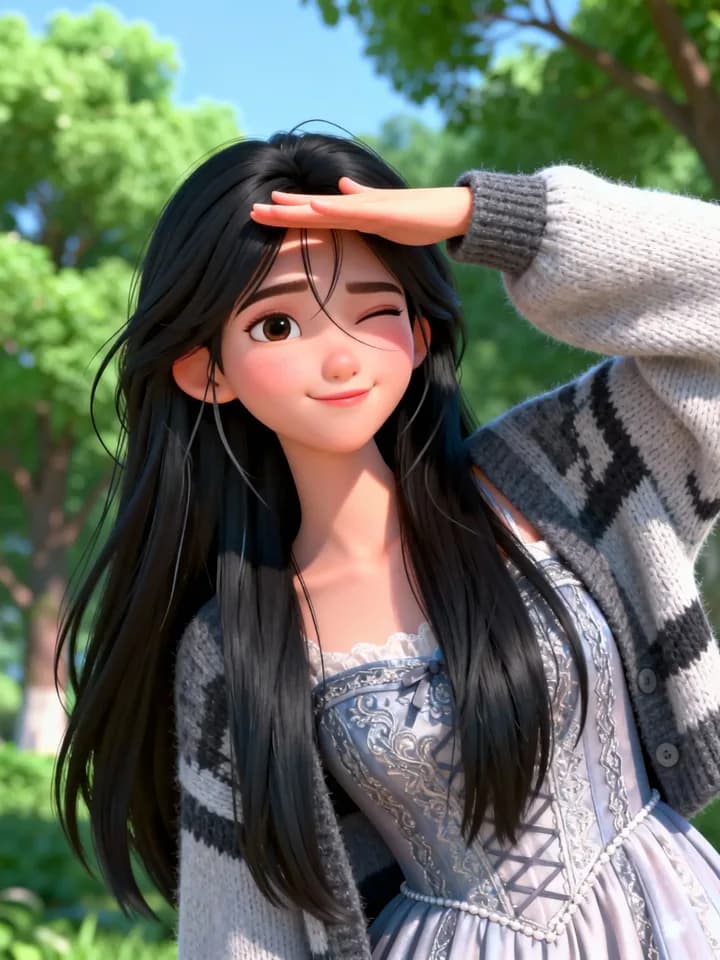
A 3D character image provides the visual identity, while the original live-action clip provides the pose sequence and timing. The result transfers the same gesture performance to the animated character.

Official Kling AI product demonstrationView the official Motion Control guide
01 · Character imageDefines the character's appearance
Official Kling 2.6 example image of a 3D animated character
02 · Original motion videoProvides the movement and timing
03 · Generated videoCombines the character with the motion

A practical motion-transfer workflow

What Kling 2.6 Motion Control does well

Use a clean, single-person performance to direct character animation without building a motion rig.

Full-body rhythm and posture

Transfer coordinated movement, timing, weight shifts, and pose changes from the reference clip.

Complex limbs and gestures

Preserve multi-limb motion and make hand gestures more readable in character performances.

Up to 30 seconds in one shot

Use Follow video for longer continuous motion, while the prompt guides background and scene details.

From reference motion to character performance

01

Upload the character

Choose one clear image with a body crop similar to the motion clip.

02

Add the performance

Upload a single-shot reference video between 3 and 30 seconds.

03

Direct and generate

Choose orientation and resolution, then use the prompt for scene and camera details.

Choose what controls the character's facing direction

Follow image preserves the reference image orientation and allows up to 10 seconds. Follow video tracks the performer's direction and allows up to 30 seconds.

Follow image

Best when the starting pose and camera direction in the character image should remain dominant.

Follow video

Best for longer performances, turns, and direction changes from the reference clip.

Input requirements

  • Use one clear, single-character JPG or PNG image with sides of at least 340 px.
  • Use one continuous 3–30 second MP4 or MOV clip with a visible, unobstructed performer.
  • Match the framing of the character image and motion video for more stable results.

Need stronger facial continuity in demanding shots?

Kling 3.0 adds improvements for identity across angles, expression transfer, occlusion recovery, and dynamic framing.

Explore Kling 3.0 Motion Control

Motion Control questions

Practical answers about inputs, duration, quality, and model behavior.

LogoNano Photo AI

Nano Photo AI — Making AI Photo and Video editing simple and efficient

GitHubGitHubTwitterX (Twitter)DiscordYouTubeYouTubeEmail

0.1%
of purchases contributed to Stripe Climate

Stripe Climate Logo

Nano Photo · Product

  • Features
  • Pricing
  • FAQ

Nano Photo · Resources

  • Blog
  • Documentation
  • Changelog
  • Affiliates
  • YouTube Trends Today

Nano Photo · Company

  • About
  • Contact
  • Waitlist

Nano Photo · Legal

  • Cookie Policy
  • Privacy Policy
  • Terms of Service

All creative tools

Video generation

  • ByteDanceSeedance 2.5
  • GeminiVeo 3.1
  • ByteDanceSeedance 2.0
  • Kling 3.0 Motion Control
  • Kling 2.6 Motion Control
  • MiniMax H3
  • Happy Horse 1.1

Image creation

  • Nano Banana
  • Nano Banana 2
  • ByteDanceSeedream 5.0 Lite
  • GPT Image 2
  • Remove background
  • Upscale image

Video tools

  • Video Reverse
  • Video Translation
  • Video watermark remover
  • AI Video Subtitle Remover
  • AI Video Enhancer
  • Instagram Transcript Generator

Creator support

  • ByteDanceSeedance 2.0 Prompt Generator
  • Nano Banana Pro Prompt Generator
  • Seed Audio

Inspiration & utilities

  • AI Video Showcase
  • Nano Banana Pro Prompt Market
  • Image Converter Suite
  • YouTube Trends Today
  • Documentation
  • Changelog
Video generation
  • ByteDanceSeedance 2.5
  • GeminiVeo 3.1
  • ByteDanceSeedance 2.0
  • Kling 3.0 Motion Control
  • Kling 2.6 Motion Control
  • MiniMax H3
  • Happy Horse 1.1
Image creation
  • Nano Banana
  • Nano Banana 2
  • ByteDanceSeedream 5.0 Lite
  • GPT Image 2
  • Remove background
  • Upscale image
Video tools
  • Video Reverse
  • Video Translation
  • Video watermark remover
  • AI Video Subtitle Remover
  • AI Video Enhancer
  • Instagram Transcript Generator
Creator support
  • ByteDanceSeedance 2.0 Prompt Generator
  • Nano Banana Pro Prompt Generator
  • Seed Audio
Inspiration & utilities
  • AI Video Showcase
  • Nano Banana Pro Prompt Market
  • Image Converter Suite
  • YouTube Trends Today
  • Documentation
  • Changelog
History tools

Video generation

  • SoraSora 2

Video tools

  • Remove Sora Watermark

Creator support

  • SoraSora Storyboard
  • TVC Ad Maker
  • Sora 2 Prompt Generator
© 2026 Nano Photo AI. All rights reserved.

Seedance 2.5 Is Now Live|Seedance 2.5 brings a more complete video creation experience, offering greater flexibility from idea generation to detail refinement, making creation easier and final production more efficient.

Seedance 2.5