H3 Max Turbo vs MiniMax H3: Speed, Quality, Resolution, and Which to Choose
How do H3 Max Turbo and MiniMax H3 differ? Compare speed, 480P/768P/2K output, duration, reference inputs, video editing, and the best use cases for each model.
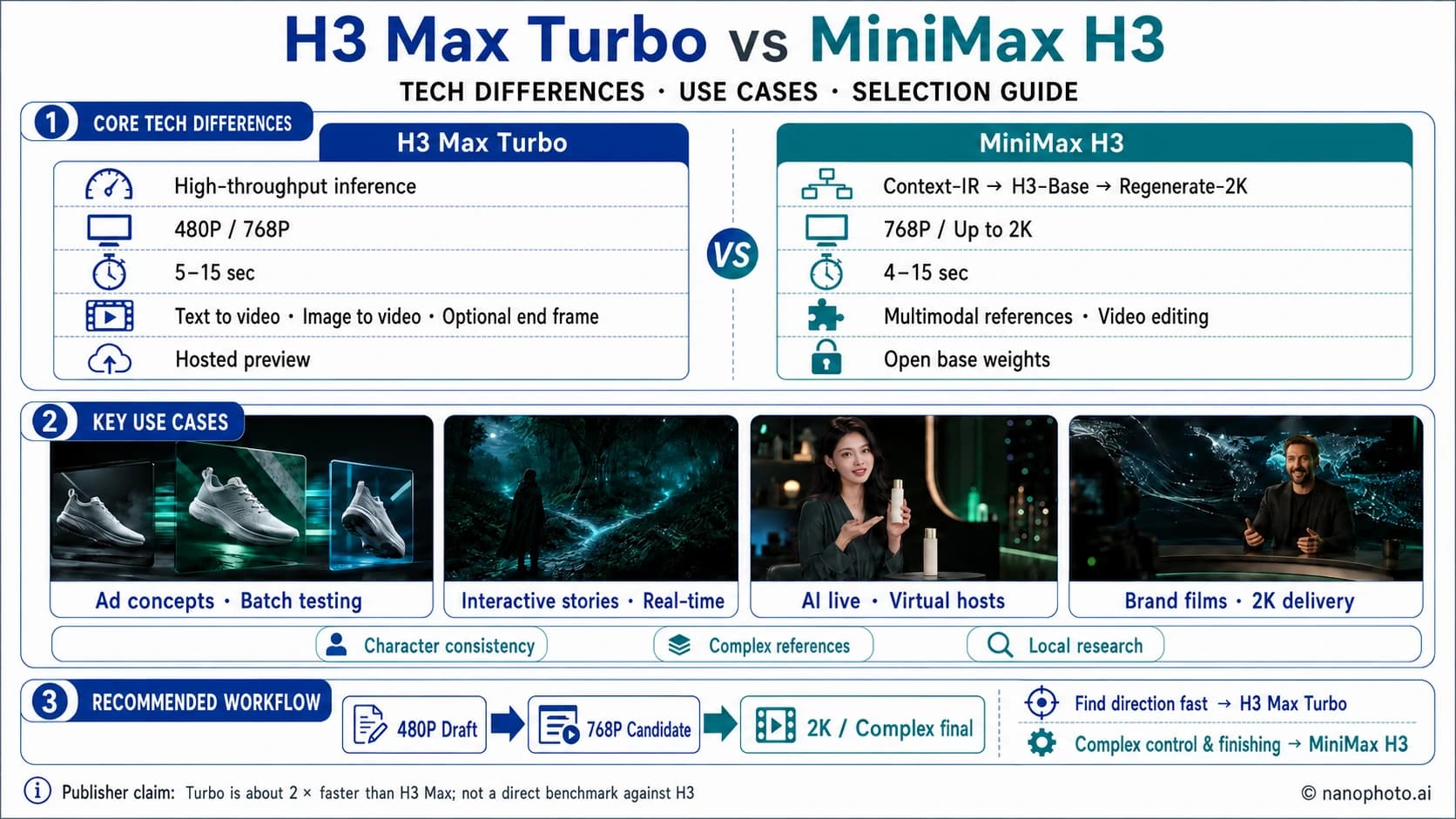
H3 Max Turbo vs MiniMax H3 may sound like a simple choice between a faster edition and a standard one, but speed is only part of the difference. The two models fit different workflows. H3 Max Turbo prioritizes low latency and rapid iteration, while MiniMax H3 offers higher resolution, richer multimodal references, and more room for finishing work.
The short answer:
- Choose H3 Max Turbo for concept testing, storyboard previews, batch variations, or interactive experiences that need fast feedback.
- Choose MiniMax H3 when delivery requires 2K output, complex image, video, or audio references, video editing, or local research access.
- Treat the claim that Turbo is "2x faster" carefully. It comes from a preview-period comparison with H3 Max, not a direct controlled test against the base MiniMax H3 model.
H3 Max Turbo performance test
Watch the generation workflow and finished clips to see H3 Max Turbo’s speed and visual results.
Video by YouTube creator @xiaoweidollar
How are H3 Max Turbo and MiniMax H3 related?
MiniMax H3 is a general-purpose multimodal video generation model released by MiniMax on July 31, 2026. It can interpret text, image, video, and audio context in one system, then generate videos up to 15 seconds long, at up to 2K resolution, with native stereo audio. The later official model repository also documents open weights for 768P base generation, start and end frame control, and multimodal references.
H3 Max Turbo is not the next base generation of MiniMax H3. A more accurate description is a preview model built on the same H3 technology and further optimized for prompt following, visual quality, and high-throughput inference. Its product role is closer to a speed-first production configuration.
This is not a case where the newer name wins in every category:
- Turbo's advantage is shorter waits, cheaper iteration, and faster feedback loops.
- H3's advantage is a higher resolution ceiling, broader input control, and greater openness.
Core differences at a glance
| Category | H3 Max Turbo | MiniMax H3 |
|---|---|---|
| Positioning | Preview model focused on speed and throughput | General-purpose multimodal foundation model |
| Technical path | Additional post-training on the H3 family, optimized for high-throughput inference | Context-IR interprets context, H3-Base generates at 768P, and H3-Regenerate-2K produces the higher-resolution result |
| Duration | 5-15 seconds | 4-15 seconds |
| Resolution | 480P, 768P | 768P by default, up to 2K |
| Text to video | Supported | Supported |
| Image to video | Start frame with an optional end frame | Zero, one, or two input images for start-frame, end-frame, or start-and-end-frame control |
| Multimodal references | The currently published workflow is more streamlined | Supports image, video, audio, and mixed references |
| Video editing | Not announced as a core preview capability | Instruction-based video editing is part of the official capability set |
| Native audio | Supported | 32 kHz stereo supported |
| Frame rate | Public service primarily uses 24 FPS | 24 FPS |
| Openness | Currently presented mainly as a hosted preview | Base model weights are public |
| Best for | Fast drafts, batch testing, interactive prototypes | High-resolution delivery, complex references, research, and extensions |
One important caveat: 2K output, video editing, reference limits, and some advanced controls may vary by access channel. For production work, confirm the options shown in the product you are actually using.
Use cases: where do the differences matter?
Specifications only become useful when placed inside a workflow. The clearest dividing line between H3 Max Turbo and MiniMax H3 is whether you are still finding a direction or finishing a deliverable.
| Use case | Better fit | Why | What to validate |
|---|---|---|---|
| Ad concepts and storyboard previews | H3 Max Turbo | Tests framing, motion, lighting, and copy rhythm faster | Prompt adherence, product appearance, usable-result rate |
| AI live streams, interactive stories, real-time experiences | H3 Max Turbo | The next segment needs to appear quickly after each user action | End-to-end latency, queues, continuous-generation stability |
| Batch social content | H3 Max Turbo | Use short 480P runs to filter directions, then output at 768P | Batch consistency, cost per usable asset |
| Brand films and large-screen delivery | MiniMax H3 | Up to 2K leaves more room for detail, crops, and post-production | Small text, materials, edges, compression quality |
| Character continuity and complex references | MiniMax H3 | Combines image, video, and audio references | Identity, wardrobe, voice, and motion consistency |
| Video editing and motion transfer | MiniMax H3 | Broader official editing capabilities | Whether edits stay controlled and untouched regions remain stable |
| Local research, fine-tuning, and custom deployment | MiniMax H3 | Base weights and technical components are public | Hardware cost, inference framework, license requirements |
Use case 1: ad concepts and batch testing
Ad teams rarely need only one finished clip at the start. They may need to compare ten directions: a static product shot or a fast push-in, studio lighting or a lifestyle look, material-focused sound or an emotional score. Turbo helps a team reject weak directions sooner. Testing at 480P and five seconds, then moving the chosen idea to 768P, is often more sensible than chasing maximum quality from the first run.
Use case 2: interactive stories and continuously generated content
For interactive stories, AI channels, and game prototypes, the critical metric is not the peak quality of one clip. It is how quickly the next segment appears after a user makes a choice. Turbo is a better fit for proving that the product loop works. MiniMax H3 can then remake important shots as higher-quality assets once the direction is settled.
Use case 3: live commerce and virtual presenters
Live formats combine speech, movement, product presentation, and audio timing. Turbo can quickly test presenter motion, camera placement, and script beats, but product shape, packaging text, and hands still need frame-by-frame review. If the final asset is going into a brand campaign, H3's 2K ceiling and complex reference support are a stronger finishing option.
Use case 4: character continuity and brand delivery
When a project depends on a fixed character, wardrobe, voice, branded materials, or continuity across shots, input control matters more than single-run speed. MiniMax H3 can organize image, video, and audio references into one context, then regenerate a 768P base result at 2K. That makes it better suited to moving from a watchable version to a deliverable one.
Technical difference 1: Turbo optimizes the inference loop, while H3 keeps the full generation system
The published MiniMax H3 system has three main components. H3-Context-IR interprets and organizes complex multimodal context. H3-Base jointly generates 768P video and audio. H3-Regenerate-2K uses the original context and base result to produce a 2K regeneration.
H3 Max Turbo has a narrower public focus. It adds post-training on top of the H3 family and co-optimizes the model with a high-throughput inference path. Its first goal is to reduce model-side generation time, not to add more input modalities or a higher output resolution. The technical objectives differ: one compresses the feedback loop, while the other preserves a more complete context and finishing system.
Technical difference 2: Turbo shortens the result-to-prompt loop
The most valuable part of H3 Max Turbo is not saving a few seconds on a specification sheet. It is shortening the creative loop.
In a typical AI video workflow, a creator waits for one generation, notices that the camera motion, subject action, or sound is wrong, changes a variable, and runs it again. The longer each wait takes, the more tempting it becomes to change several things at once. That makes it harder to tell which instruction caused the improvement.
Turbo is better suited to small-step prompting. Start with 480P and a short duration to establish framing and motion. Once the prompt is stable, lock it and generate 768P candidates. Product ads, short-form openings, shot previews, and A/B concepts all benefit from that rhythm.

The preview announcement published on September 3, 2026 described Turbo as delivering about 2x the model inference speed of H3 Max, at roughly half the cost, while targeting the 97th percentile of H3 Max quality on the publisher's internal evaluation. Three boundaries matter:
- The comparison model is H3 Max, not the base MiniMax H3.
- The numbers come from the publisher's own evaluation, not an independent third-party benchmark.
- Model inference time is not the same as total user wait time. Queues, safety checks, uploads, and result storage all add to end-to-end latency.
The 2x figure is useful for understanding the product's position. It should not be turned into a service promise for every generation.
Technical difference 3: MiniMax H3 raises the finishing ceiling with 2K regeneration
MiniMax H3 becomes more compelling when the job changes from "show me a version we can discuss" to "deliver the final film."
Up to 2K output
H3 first creates a 768P video, then runs a regeneration process that reuses the original context to produce 2K output. This is more than conventional pixel upscaling. The model revisits the text and multimodal references to rebuild detail. Small text, materials, and complex edges still require human review, but 2K leaves more room for finishing and delivery.
H3 Max Turbo's currently published output options center on 480P and 768P. That is usually enough for social previews and interactive prototypes. For large displays, commercial finishing, or footage that needs additional cropping, 2K is more valuable.
Technical difference 4: multimodal context determines complex control
MiniMax H3 can combine image, video, and audio references, allowing the model to understand how character appearance, shot rhythm, motion style, and sound relate. The official repository documents limits of up to nine reference images, three reference videos, three reference audio clips, or 12 mixed files. Video and audio references also have duration limits.
This control is useful for character continuity, brand visuals, motion transfer, and audio-driven work. Turbo currently behaves more like a lightweight, direct generation entry point: begin with text, or use a start frame to establish the image, then add an end frame when the destination also needs control.

Technical difference 5: video editing and open weights matter for further development
MiniMax H3's official capability set includes instruction-based video editing, and its base model weights are public. That matters to research teams working on local deployment experiments, fine-tuning, and custom workflows.
At the time of this review, H3 Max Turbo was still labeled as a preview. Its public entry point emphasized text-to-video and image-to-video. We did not find separate open weights or documentation matching MiniMax H3's range of complex references and video editing, so those capabilities should not be assumed.
Both models generate native audio, so workflow remains the real dividing line
Both models continue the H3 family's joint video and audio generation. A prompt can describe ambient sound, action sound, dialogue, and spatial character, with image and audio created in the same generation.
Whether a model supports audio is therefore not usually the deciding factor. More useful questions are:
- Is dialogue clear, and do lip movements match the sound?
- Do action sounds happen at the correct moment?
- Are voices and spatial ambience stable across repeated generations?
- How many results can be used without another run?
Live commerce, virtual presenters, and real-time content depend heavily on feedback speed. Turbo can validate whether a script and motion direction work sooner. H3's broader control is more useful when brand-level quality or complex character references are involved.

What can we learn from @BlendiByl's public demos?
The @BlendiByl account you shared is not a separate official model account. Its public bio identifies it as the personal account of an engineer on the development team. It is useful for seeing working prototypes and new interaction patterns, but it should not be the only source for specifications.
A recent pinned public demo shows an AI video streaming prototype powered by H3 Max Turbo. Users can watch generated programming and continue by creating their own stories. The account has also shared interactive dating simulations and AI live-commerce experiments.
These examples suggest that Turbo's opportunity goes beyond making one short clip faster. It can support product forms that were previously difficult because every wait was too long: continuously generated channels, interactive stories, live presenters, frequently changing product displays, and experiences that create the next segment after every user choice.

Social demos show that a direction is ready for prototyping. They do not prove stable concurrency, reliability, or unit economics. Before launch, teams still need to test queues, retries, moderation, storage, playback latency, and cost limits.
Which one should you choose?
Choose H3 Max Turbo if you need to:
- See motion drafts quickly during a meeting or creative review.
- Test multiple camera, lighting, and action variations for the same script.
- Prototype interactive stories, real-time experiences, or flows that users can keep modifying.
- Find a direction at 480P, then create 768P social candidates.
- Reduce the effect of generation waits on the creative rhythm.
You can start with text or an image on the NanoPhoto.AI H3 Max Turbo page.
Choose MiniMax H3 if you need:
- Final delivery at up to 2K.
- Combined image, video, and audio references.
- More control over character, motion, or style consistency.
- Instruction-based video editing.
- Open weights, local research, or custom deployment.
You can also combine them in one project
The most practical approach is often staged rather than exclusive:
- Use Turbo at 480P and five seconds to validate the subject, action, and camera.
- Change only one important variable at a time until the prompt stabilizes.
- Generate several 768P candidates with Turbo.
- If the project needs 2K, complex references, or more editing, move to MiniMax H3 for the final output.
This "draft with Turbo, finish with H3" workflow is usually more efficient than repeatedly experimenting at the highest specification from the start.
How to run a fair A/B test
Do not compare two models using different prompts, resolutions, and durations. Fix the following variables, then run each model several times:
- The same prompt and negative constraints.
- The same start frame or start and end frames.
- The same 768P resolution and five-second duration.
- The same random seed, if the interface provides one.
- The same prompt enhancement settings.
- At least 5-10 repeated generations.
Track five metrics: end-to-end wait time, subject and prompt consistency, motion and audio synchronization, stability across runs, and the share of results that can be used immediately. The last metric is especially important. A cheaper or faster individual run may cost more overall if it requires many extra attempts.
Frequently asked questions
Is H3 Max Turbo MiniMax's official next-generation H3 model?
No. It is a speed-optimized preview model built on the MiniMax H3 family, not the next foundation model released by MiniMax. MiniMax H3 remains the base model with 2K, multimodal references, editing, and open-weight capabilities.
Is H3 Max Turbo twice as fast as MiniMax H3?
That conclusion is not currently supported. The 2x figure comes from the publisher's internal comparison between Turbo and H3 Max, not a controlled Turbo versus MiniMax H3 test. Actual wait time also depends on platform queues, uploads, moderation, and storage.
Does the 97th percentile mean Turbo keeps 97% of the image quality?
No. It describes a target position in the publisher's own evaluation. It does not mean that every clip preserves a fixed 97% of quality, and it is not a substitute for independent blind testing.
Does Turbo support 2K and complex references?
The public preview specifications reviewed here focus on 480P/768P output, text-to-video, image-to-video, and an optional end frame. If you require 2K, complex image, video, or audio references, or video editing, MiniMax H3 is the safer choice. Confirm the exact capabilities of your current access channel before production.
Can both models generate sound?
Yes. Both jointly generate video and audio. Prompts should specify ambient sound, action sound, dialogue, and timing instead of describing only the image.
Final recommendation
H3 Max Turbo matters because it moves AI video from "submit and wait" toward "see the result and keep creating." It suits exploration, batch work, interaction, and speed-sensitive products. MiniMax H3 is a better fit for high-resolution delivery, complex multimodal control, and open research.
The simplest way to remember it: Turbo helps you find the answer faster. H3 preserves more ways to finish it.
Specifications were reviewed on September 4, 2026. Sources include the official MiniMax H3 announcement, the official MiniMax H3 model repository, and @BlendiByl's public prototype demo. Preview specifications may change, so confirm the current product interface before starting production work.
Author

Categories
More Posts
NanoPhoto.AI Now on OpenClaw — Create Comic Dramas, Images & Videos Right from Chat
NanoPhoto.AI launches OpenClaw skills: generate Sora 2 videos, Veo 3.1 long-form videos, Nano Banana Pro images, and produce full comic dramas — all from Telegram, Feishu, WeChat and more.

YouTube video to shot-by-shot AI prompts
Turn a reference video into a usable shot list: check cuts, describe camera movement, write one prompt per shot, and keep visual continuity.

Remove burned-in subtitles without cropping
Keep the full frame when removing burned-in subtitles. Learn how to choose a test clip, inspect motion artifacts, and check the downloaded video.
Newsletter
Join the community
Subscribe to our newsletter for the latest news and updates