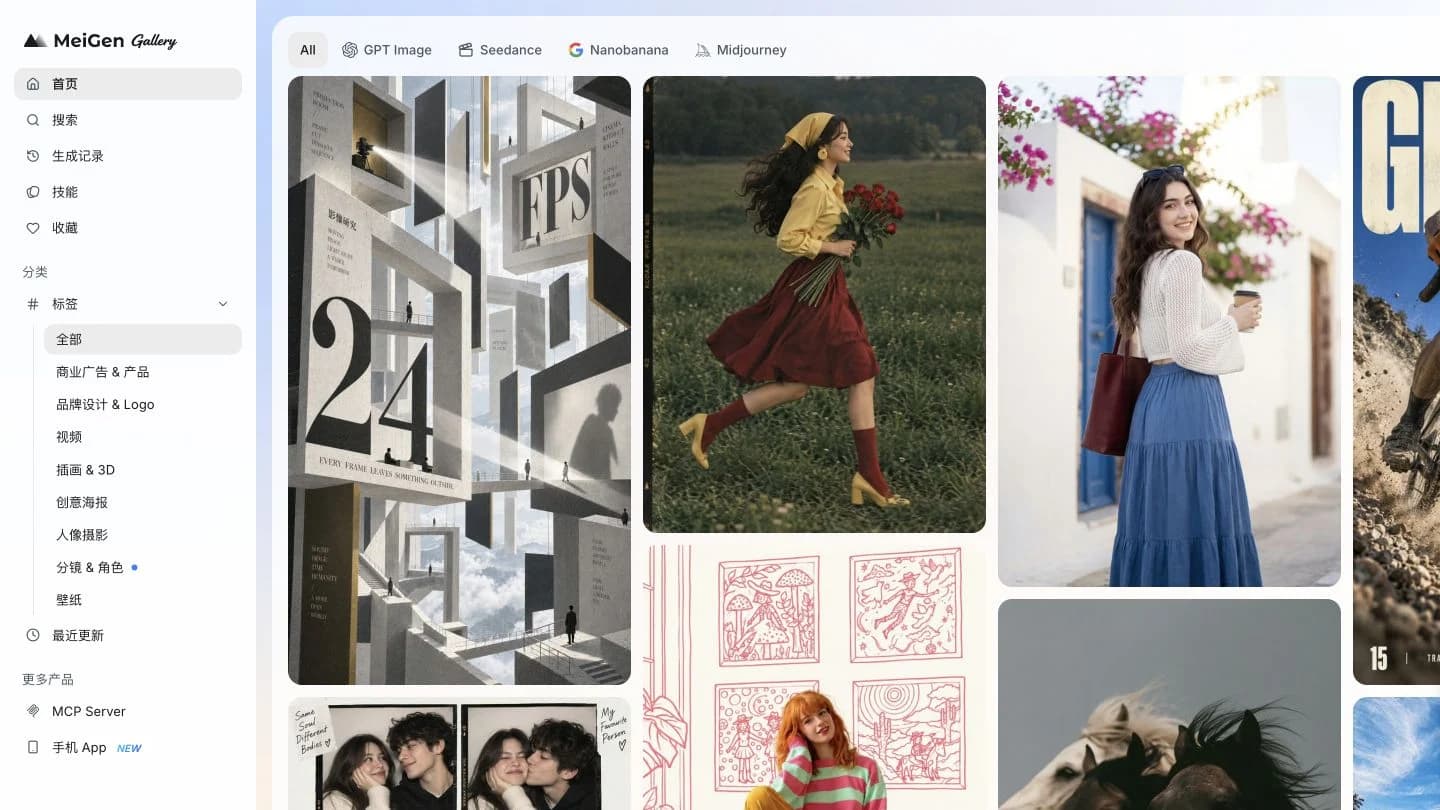
Meigan AI 2026 Review: A Hands-on MeiGen Tutorial
A real MeiGen walkthrough with screenshots: choose a prompt, generate a product photo, inspect the result, and understand credits, pricing and limitations.
MeiGen is worth trying if your biggest obstacle is finding an image idea and turning it into a usable prompt. Its gallery and generator sit together, which makes the move from inspiration to a first draft unusually direct. Our product-photo test completed successfully, but applying a gallery prompt also changed generation settings. Checking the model and credit cost before clicking Generate is an essential part of the workflow.
Searching for Meigan AI 2026 Review? The website at meigen.ai spells its name MeiGen. This review covers that product.
Tested September 18, 2026. Published by NanoPhoto.AI, which also offers AI image and video tools. This is a browser walkthrough prepared with AI assistance, not an unaffiliated laboratory comparison. We inspected the logged-in desktop interface, applied a community prompt, replaced it with our own, completed one image generation, opened its preview and checked the pricing window. We did not benchmark video generation, reference-image editing, API access or every model. Screenshots retain the Chinese interface used during the test; captions and instructions are localized.
Open the MeiGen gallery to follow along.
What MeiGen does well—and what we actually tested
MeiGen combines a visual prompt library with a generation workspace. You can inspect the image that accompanies a prompt before deciding whether its composition is relevant to your task. During our visit, the gallery offered model filters and categories for product advertising, branding, illustration, portraits and other visual work. The generation panel also exposed reference-image and image-to-prompt controls. Seeing a control is not the same as testing its output, so those features are outside the result assessment below.
The most useful distinction is between finding inspiration, reusing text and reproducing an image. The first two were straightforward in our session. The third is not guaranteed: a different model, reference image or setting can lead to a different result, even when the words look similar. Treat a gallery card as a creative starting point, not a promise of an identical export.
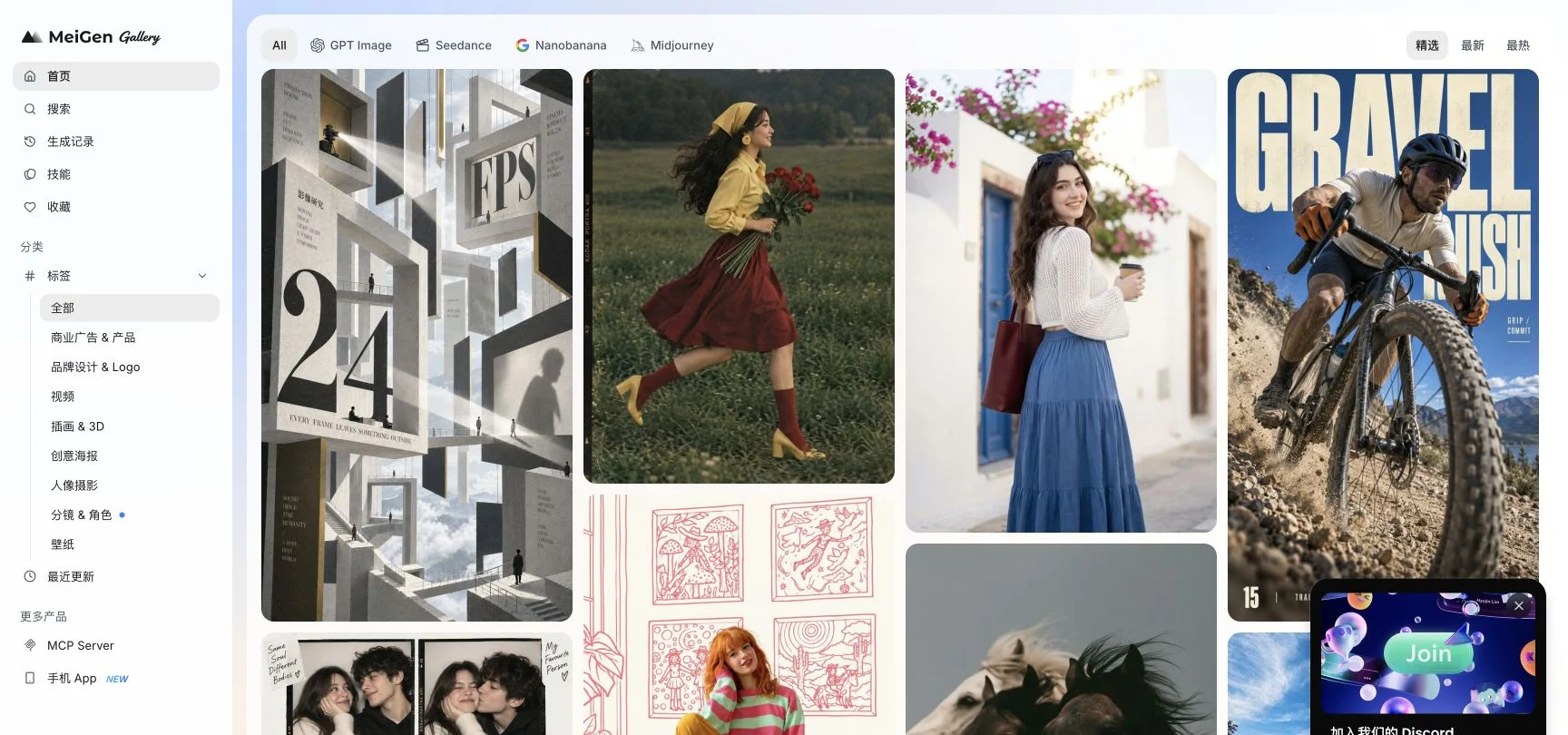
Step 1: Pick a reference that matches the job
Start with a small brief: a portrait-format image for a reusable bottle, with a clean background and space for a headline. This makes it easier to reject beautiful but irrelevant examples. A busy poster is less useful than a simple product photo when you need a clean ecommerce campaign image.
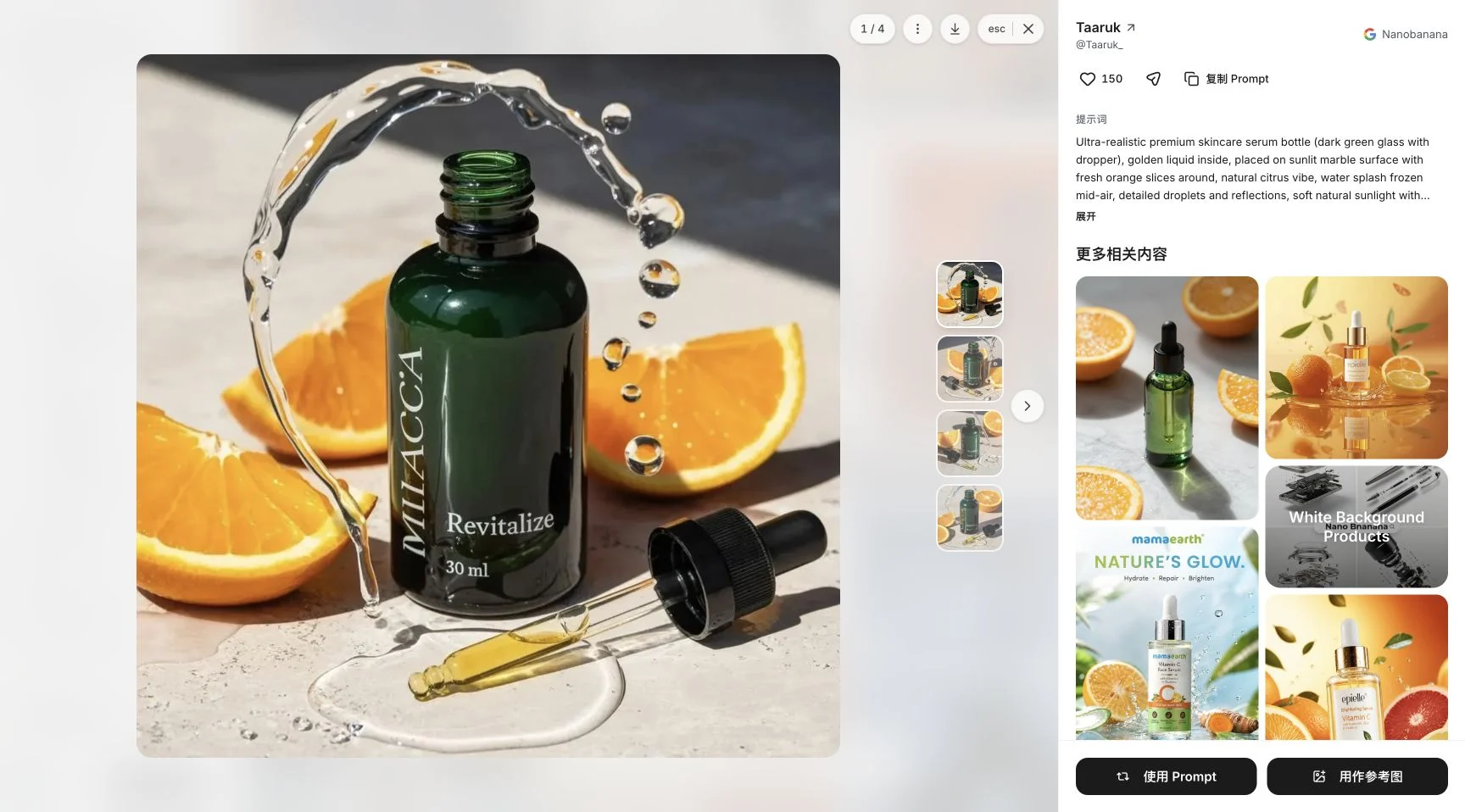
Open the gallery and browse the product-advertising category, or use Search to find a relevant subject. In our session we opened Taaruk’s skincare product prompt. Its detail view displayed the creator, model label, prompt and related examples. Inspect the composition and light before copying anything. Also check whether the wording assumes an uploaded image: a prompt that says to preserve the original subject cannot do that without the corresponding input.
We chose the example to inspect the workflow, then wrote a different bottle brief. We did not present the creator’s skincare image as our own output or copy the full community prompt into this article.
Step 2: Use the prompt, then check what changed
The detail view offers distinct actions. 复制 Prompt copies the text; 使用 Prompt applies it to the generator. 用作参考图 is a separate reference-image action. These choices are not interchangeable. Reusing text does not mean a reference image has been uploaded.
Click 使用 Prompt to bring the prompt into the editing panel. In our session this also changed the selected model to Nanobanana 2 and the resolution to 2K. The generation button then displayed 5 credits. This is a meaningful usability detail: do not assume the settings visible before opening a card are still active afterward.
Replace the subject and constraints to match your own assignment. Keep the prompt, model, resolution, image count and aspect ratio together in your notes. That record will be more useful for a second attempt than saving only the text.
Step 3: Write an original, reproducible product-photo brief
Here is the exact English prompt we entered. It stays in English in every language version of this article so readers can reproduce the same input; that does not mean MeiGen requires English.
Create a studio product photograph of a matte cobalt-blue reusable water bottle with a brushed steel cap. Place it on a pale sand-colored block, with a single fresh lemon beside the base. Soft window light from the upper left, realistic contact shadow, subtle condensation, clean warm background. Leave empty space above the bottle for a headline. No logo, no lettering, no watermark. Vertical 4:5 composition.
This brief names one main object, its material and color, a supporting prop, the light direction and the layout. The bottle provides a clear focal point. The lemon creates a color contrast without introducing a crowded scene. Asking for empty space makes the image easier to use in an ad layout, while excluding text avoids making this a typography test.
For your own project, change the product and background deliberately. If you need an exact real-world package shape, a text-only fictional bottle is not an adequate product-fidelity test. Use an authorized reference-image workflow and inspect branding and proportions separately. We did not test that workflow here.
Step 4: Set the ratio, resolution and credit budget
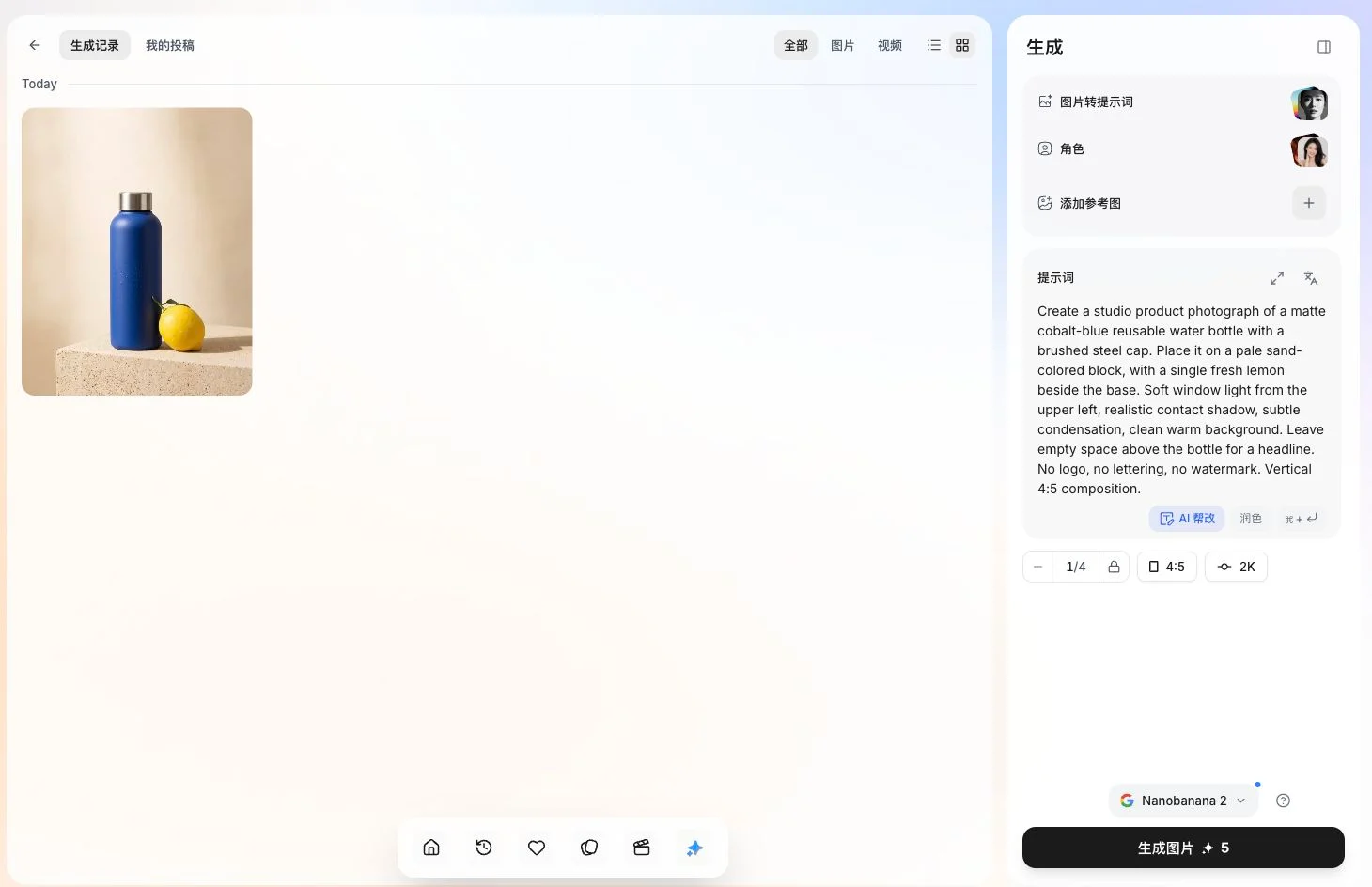
We selected 4:5, kept 2K, chose one image and used the displayed Nanobanana 2 model. The screenshot below records those choices. The small 1/4 control was the image-count setting; it did not mean that four images would be generated in this test.
If the editor expands into focus mode and hides the settings, use 专注模式 to return to the compact editor. Before submitting, confirm that the prompt is complete, no unintended reference is attached and the final button cost matches your budget. The official model-pricing page states that the cost shown on the generation button at submission is authoritative.
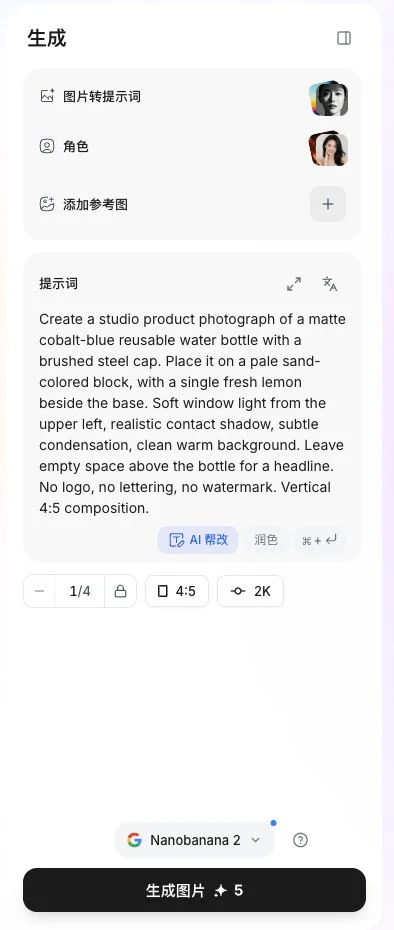
Click 生成图片 once. Our balance moved from 30 to 25 credits and a single image appeared in history. The starting balance was an existing account balance; it is not evidence of a 30-credit sign-up offer. We did not purchase a package for this test.
Step 5: Find the output before submitting another job
Open 生成记录, the generation-history section. Our task briefly passed through a content-loading error before history showed progress and then the completed image. We did not submit the generation again. If you see a similar state, inspect history and your balance before repeating the job: a screen-loading failure does not necessarily mean the underlying generation was rejected.
The completed card exposed preview, edit and download controls. Click the image to inspect it at a larger size. The 下载 control is the download action; 发布 is a separate publishing action. We verified the preview and the presence of the download control, but did not verify a downloaded export file or publish the result to the community. The illustration below is a capture of the completed session.
The result: useful composition, with a narrow test scope
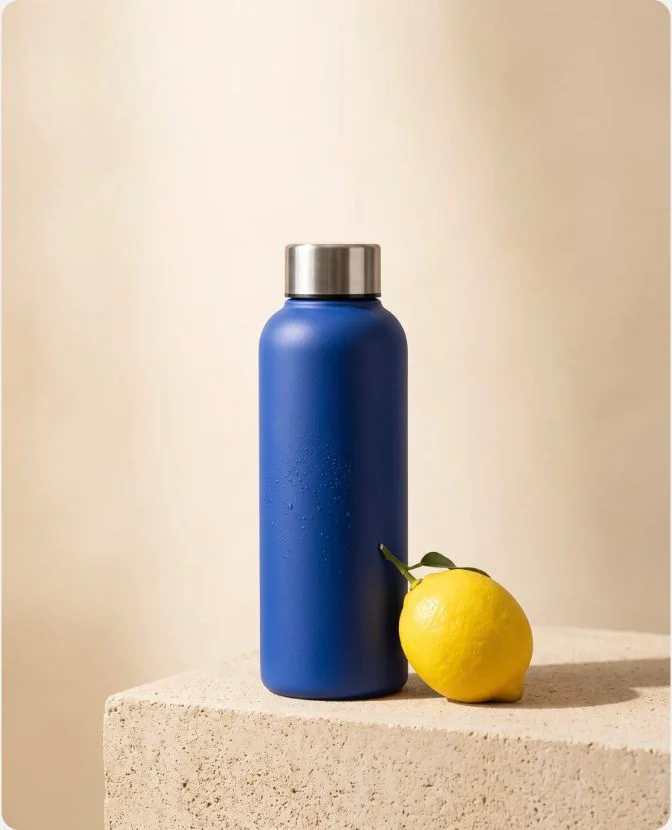
The generated image visibly contains a cobalt-blue bottle, a metallic cap, a lemon, a pale block and substantial space above the subject. The preview image reported 1650 × 2048 pixels, close to the selected 4:5 format. Its lighting and contact shadow give the objects a readable placement in the scene. There is no visible branding or headline, as requested.
For an early campaign concept, that is a useful outcome. It is not proof that the service can reproduce a manufactured product accurately, preserve a face across scenes or typeset a multilingual advertisement. The condensation is subtle, and the minimalist result still needs your own design and brand review before use. We tested one output, so we do not assign a success rate, speed ranking or numerical quality score.
For a second experiment, change only one variable—for example the bottle color—while retaining the other settings. That is a suggested next test, not an additional run we completed. Keep both versions so you can distinguish prompt effects from model changes.
Is MeiGen free? Read the allowance and per-image cost separately
On September 18, 2026, the Chinese pricing window advertised a Free tier with 20 daily credits restricted to basic models, 2K resolution and one parallel task. Paid packages were described as one-time purchases without automatic renewal, with purchased credits that do not expire. These are displayed product terms, not independently audited guarantees.
| Package | Price displayed in our Chinese interface | Credits shown |
|---|---|---|
| Free | ¥0 | 20 daily, basic models only |
| Starter | ¥79 | 1,000 purchased credits |
| Pro | ¥159 promotional display | 2,200 purchased credits |
| Ultimate | ¥399 promotional display | 6,000 purchased credits |
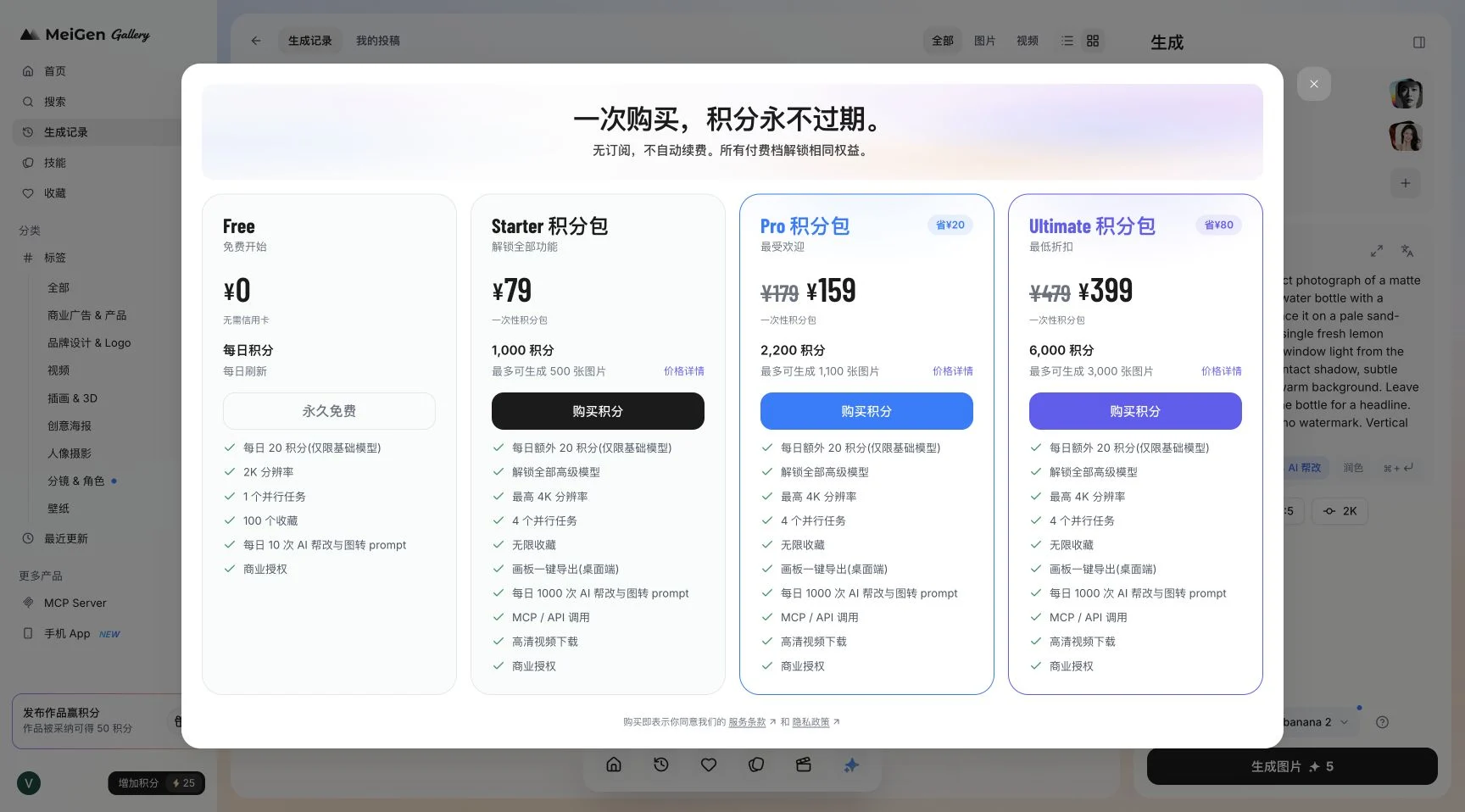
These are the original ¥ amounts, not a USD quote or a currency conversion. Verify currency, tax, eligibility and current promotions in your own checkout. The package window is accessible through the credit-balance button; model costs are separately listed on the official pricing table.
The distinction matters when estimating output. At our observed 5 credits per image, 1,000 credits would fund 200 equivalent generations, assuming the same rate, no other usage and no extra charges. That arithmetic does not make every model available under the free daily allowance, and it does not turn a package’s maximum-image headline into a promise for your chosen settings.
MeiGen or NanoPhoto: choose by the next task
NanoPhoto publishes this article, so the comparison has an explicit product affiliation. We compare workflow fit, not declare a universal quality winner. The NanoPhoto links below document available tools; we did not run an identical image benchmark across both services.
| Your next task | MeiGen evidence | NanoPhoto route |
|---|---|---|
| Find a visual idea and adapt its prompt | Gallery → prompt detail → generator was tested | Browse our video showcase for our product examples |
| Create an image from a written brief | One Nanobanana 2 job completed here | Nano Banana Pro image generator offers another image workflow |
| Analyze a video to draft a prompt | Not tested in this review | See the dedicated video-to-prompt tool |
| Compare actual spending | MeiGen package screenshot and observed 5-credit job | Check NanoPhoto pricing against the tool you plan to use |
Choose MeiGen when browsing community examples is central to your process. Consider NanoPhoto when one of its dedicated creation or analysis tools matches the next job. Compare cost per useful result with equivalent inputs; credit counts from different services are not equivalent units.
Common questions and practical limits
Why does my image look different from the gallery example?
Check the selected model, image inputs, ratio and resolution first. In our test the model changed when we applied a prompt. A gallery example may use inputs you have not supplied, and generation is not a promise of pixel-identical reproduction.
Can I use every model with daily free credits?
Do not assume so. The pricing window explicitly limited the daily allowance to basic models. Our existing balance and one successful generation do not establish eligibility for every free account.
Are the screenshots localized versions of the app?
No. They are genuine captures of the Chinese UI used for this test, with localized explanations around them. We preserve actual button labels so you can match the written step to its screenshot.
What should I check before using an image commercially?
Separate the service’s plan terms from the rights to a community example, uploaded reference, logo or recognizable person. A commercial-use label does not establish ownership of all material visible in the gallery. Consult MeiGen’s terms and use inputs you have permission to provide.
Verdict and sources
MeiGen delivered the most important part of this tutorial: a complete path from a visual example to an original generated image. Its gallery-to-editor flow is the main reason to try it. The main cautions from our session are settings changing with a reused prompt, model-dependent credit costs and a transient history-loading error. Start with one small job, inspect the result and budget additional attempts based on the actual button cost.
Sources checked September 18, 2026: MeiGen gallery and credit window, the community prompt we inspected, official model pricing and terms. Interface screenshots and the generated bottle example were captured during this walkthrough. Recheck pricing before purchase and revisit this review after substantial product changes.
Author

Categories
More Posts
Hands-on Review: I Used NANO PHOTO to Turn an Idea into Video + Images (Sora 2 / Veo 3.1 / Nano Banana Pro)
From zero-friction onboarding and prompt assistance to credits and pricing logic—this is a real-user walkthrough end to end.
NanoPhoto.AI Now on OpenClaw — Create Comic Dramas, Images & Videos Right from Chat
NanoPhoto.AI launches OpenClaw skills: generate Sora 2 videos, Veo 3.1 long-form videos, Nano Banana Pro images, and produce full comic dramas — all from Telegram, Feishu, WeChat and more.

Remove burned-in subtitles without cropping
Keep the full frame when removing burned-in subtitles. Learn how to choose a test clip, inspect motion artifacts, and check the downloaded video.
Newsletter
Join the community
Subscribe to our newsletter for the latest news and updates